Showing posts with label Android. Show all posts

Thursday, October 25, 2018

2 months into Flutter

So I've been learning Flutter trying to get in deep. I'm been using Flutter for make an Android app and so far, I'm largely impressed but I have met a few small annoyances.

The good. 

1. Hot reload is the killer feature. I won't be a happy mobile developer if have to wait for the damn AVD to restart to see my changes. 

2. Android Studio support. I'll have to disclose that I'm also a Pycharm user so you could say this is a biased assessment. I've tried Flutter with VSCode, it works but having to manage the Android stuff like AVDs manually is a pain.

3. Good looking apps fast. Once you figure out how the layout system works along with the theming system, you'll have a blast creating your app UI also tweaking it.

4. Aside from good looking app, you also have nice responsive apps. Although I have to admit, the app I built didn't have that many moving parts.

The bad.

1. Dart. The language is like Java and JavaScript had a bastard child. Being a Python dev for the last decade, the curly braces just irks me. Also, it has a lot of optional syntax rules that bug me. 

2. The learning curve. Flutter isn't particularly easy especially for those without CS or programming training or experience. For example, how it handles databases and API calls is via Futures; Learning how to use Futures isn't trivial especially if you want a maintainable code base.

3. Missing key IDE features. The feature I'm taking about is the "build" feature. If you are using Android Studio, you'll still be forced to use the command line to build your final release APK. You can't do this from the IDE. May be the future.

I got nothing if you're an IOS developer.

Conclusion:

Flutter works although it has some of rough edges. I'd like to think these rough edges are teething problems. I expect a couple of these rougher edges be polished away before the end of year. I'm liking Flutter so far and I think I'm in good company - Alibaba used Flutter for their Xianyu app.


Friday, August 11, 2017

NativeScript and that "status 200 url null" error

This error confused me while developing with NativeScript trying to do a rest api call. Without digging thru the error object, you only get: "Response with status: 200  for URL: null" for the error text. Not exactly useful.

I then had to run "tns debug android" and dig thru the error object by doing adding a "json()" method call to it. I then got a more verbose error message. Something like:

"Error: java.net.ConnectException: failed to connect to localhost/127.0.0.1 (port 8000): connect failed: ECONNREFUSED (Connection refused)"

The chrome devtools also was cryptic only saying that the rest api call "Stalled".

Ok. So I then visited StackOverflow looking for a solution. No dice. Until, I realized that I'm doing development using an android emulator which is basically a virtual machine. And being a virtual machine calling 'localhost' or 127.0.0.1 is calling itself. The address is loopback address of the vm NOT my machine. No wonder the rest api call was failing. Fortunately, the android emulator networking is setup to work with localhost development.

The solution is to just change the rest api call from 'http://localhost/api' to http://10.0.2.2/api'.

Now it works.

For the curious, my rest api server is a Django Rest Framework app running locally.


Saturday, March 25, 2017

Visual Studio 2017 Xamarin stuck if you didn't install the SDK and NDK

I ran into this bug when I was upgrading from Visual Studio 2015 to 2017. I included the Xamarin option But I didn't include the Android SDK and NDK. I removed them from the install list. I did this because I already have both installed.

The "hang" occurs then you try opening the Xamarin in the Options window. Visual Studio will stop working here so you can't set the paths for Xamarin.

So I went digging through the Xamarin logs in the AppData folder. I know where the log folder is from a previous issue with Xamarin. Xamarin is a good idea but it's buggy as fuck. So navigate to %USERPROFILE%\AppData\Local\Xamarin\Logs\15.0\ folder and see which is the latest log and open it with your favorite text editor.

Once we confirm, if it's really the missing SDK and NDK paths, we then have to add them to Window's Registry.
  1. Open regedit
  2. Navigate to Computer\HKEY_CURRENT_USER\SOFTWARE\Xamarin\VisualStudio\15.0\Android
  3. Right-click and add new String Values
    • AndroidNdkDirectory - set it to the full path to where you install the NDK 
    • AndroidSdkDirectory - set it to the full path to where you install the SDK
  4. Close and restart the computer
And we should have fixed the issue.


Wednesday, March 5, 2014

Whatever you do don't lose that Android keystore

What is Android keystore? A keystore is a used for signing Android apps so they can be published on the Play Store. How that Android app is made either native, hybird, whatever doesn't matter. You will still need that key.

To use a key store you need to do two things:
  1. Go to the AndroidManifest.xml file and change android:debuggable from "true" to "false". You then run a build
  2. Next is to sign the resulting APK (after running the build) with the javarsigner. The command should look something like:

    $ jarsigner -verbose -sigalg SHA1withRSA -digestalg SHA1 -keystore my-release-key.keystore HelloWorld-release-unsigned.apk alias_name
    
Now this assumes that you have created the keystore already if not then you have to go to your JDK folder and look for the keytool command.

$ keytool -genkey -v -keystore my-release-key.keystore -alias alias_name -keyalg RSA -keysize 2048 -validity 10000

This will create a file that you must not lose under and circumstance. Do whatever it takes to keep it safe because if you lose then you won't be able to submit updates to your app.

Trust me on this, it's far less stressful keeping your keys safe than losing it. Can you imagine the hassle of having your users to re-install your Android app?

Wednesday, May 22, 2013

Android and the case of making app assets

ActionBarSherlock
Let's face it's fun to visualize and design Android apps at first then it goes down hill from there. I mean creating all them icons, gradient backgrounds and other assets is boring and sometimes down right tedious. And you have to it 3 times! So why not use a generator?

I have been using this website for a couple of projects: Android Assets Studio.

I'm a big fan of Roboguice (my blog entry) and the ActionBarSherlock which the Android Assets Studio complements. Using the studio allows me to generate the nine patch assets plus associated XML drawables and styles which I then copy straight into my project.

It's also nice that Studio has a bunch of icon generators. I especially find the generic icons pretty hand.

Friday, October 26, 2012

In Android: Long press = right click

Share anyone?
I just sat through an IPad demo for education. The demo was basically about using IPad as a teaching tool for college/university level instruction. It was pretty good but then I notice something wrong amiss with the IPads. You can't just share data between apps like I just can't just pass links from say Safari to Chrome.You have to do a copy-paste procedure which is kinda stupid and unnecessary.

For Android old-timers, doing stuff like that is a piece of cake. Just do a long press and you will be presented a "Share via" option and then you can send where you want it and the target know what to do with it.

New Android people seem to be limited to point-click and swiping with their phones and/or tablets. If they do a long presses on stuff in their phones they'll discover a whole new layer of features to play around with.

Android programmers know this as "Intents". In Android, the 3 core components of an application — activities, services, and broadcast receivers — are activated through messages, called intents. Thus allowing my app to pass data and stuff to other apps. That's cool in every which way you look at it. Which begs the questions:

Why the copy-paste procedure Apple?

Edit: Apparently, Windows Phone does the same with Bing Search and Internet Explorer. That's sad.

Wednesday, September 12, 2012

WHY U NO USE ROBOGUICE!?!

That's exactly how I ask myself after trying out Roboguice 2 after a tutorial or two.

I discovered Roboguice after a guy in my facebook group posted a link to an excellent Android stack named android-bootstrap. Android-bootstrap is boilerplate application that includes tons of great open source tools and frameworks. I'll save this one for another time.

Back to Roboguice, roboguice adds dependency injection patterns to Android development. It adds annotations that makes writing Android applications like Spring apps in the J2EE space. It basically takes something that looks like this:

class AndroidWay extends Activity { 
    TextView name; 
    ImageView thumbnail; 
    LocationManager loc; 
    Drawable icon; 
    String myName; 

    public void onCreate(Bundle savedInstanceState) { 
        super.onCreate(savedInstanceState); 
        setContentView(R.layout.main);
        name      = (TextView) findViewById(R.id.name); 
        thumbnail = (ImageView) findViewById(R.id.thumbnail); 
        loc       = (LocationManager) getSystemService(Activity.LOCATION_SERVICE); 
        icon      = getResources().getDrawable(R.drawable.icon); 
        myName    = getString(R.string.app_name); 
        name.setText( "Hello, " + myName ); 
    } 
} 

To something like this:

class RoboWay extends RoboActivity { 
    @InjectView(R.id.name)             TextView name; 
    @InjectView(R.id.thumbnail)        ImageView thumbnail; 
    @InjectResource(R.drawable.icon)   Drawable icon; 
    @InjectResource(R.string.app_name) String myName; 
    @Inject                            LocationManager loc; 

    public void onCreate(Bundle savedInstanceState) { 
        super.onCreate(savedInstanceState); 
        setContentView(R.layout.main);
        name.setText( "Hello, " + myName ); 
    } 
} 

That's some kind of witchcraft if you ask me but still you can't argue how convenient this style of programming can be and we all know programmers are lazy as sin.

Wednesday, May 30, 2012

Which thing to use: phonegap or codename one?

I have been puttering around with Phonegap and then I stumbled upon CodenameOne. Both are frameworks for making applications for mobile devices and will run on Netbeans (although Android support for Netbeans could be better). So which leads us to the question of the moment: which thing to use?

Let's start with what's common with the two:

1. One code base for almost all mobile platforms: IOS, Android, Blackberry and Windows Phone. PhoneGap is the only one that (right now) supports Windows 7. CodenameOne promises to support it soon. CodenameOne now supports Windows Phone.

2. Both use the pay for building app model. Assuming that you are using the free account; With Phonegap you are limited to 1 app/1 collaborator while CodenameOne limits you to 100 build credits every month and 1 app at the time.

PhoneGap Codename One
IDE Support Optimal on Eclipse; Can be used on Netbeans but stifled because of Netbean's weak support for Android. Has an excellent plugin for both Eclipse and Netbeans
Tooling HTML5, CSS and JavaScript Just Java
Supports IOS, Android, BlackBerry, WebOS, Symbian, Windows Phone IOS, Android, BlackBerry, J2ME, Windows Phone
Documentation Excellent Also excellent
Feels like ...making a website; lots of JavaScript ...old school Swing desktop development

So which one to use? Truth be told, that depends on what you are comfortable with. If you're an old hand with Java and you want to make mobile applications then (I suggest that you) go with Codename One but if started out as a web developer then you might want to go with PhoneGap.

Although both fill the mobile development niche, but have different approach vectors. Different strokes for different folks.

Sunday, May 20, 2012

Be a game programmer they said

Be a games programmer they said. It's going to be fun they said.

Making games from scratch 10 years ago was hard. Try reading Tricks of the 3D Game Programming Gurus-Advanced 3D Graphics and Rasterization by Andrew LaMothe. The Math alone will make you cry, I did. I thought making a game for Android will be equally as hard. Glad to know there's AndEngine.

AndEngine is a framework for building games on the Android platform. It provides a lot of abstractions so as a programmer you don't have to deal with the low-level details. I particularly like the AndEngine physics extension - rolling your own physics engine is no walk in the park.

A few pointers on getting started with AndEngine:

1. You'll need an actual phone for this. The AndEngine examples can't run on the virtual devices since they can't support the OpenGL stuff.
2. AndEngine is designed for 2D not 3D.
3. As for the turtorial, when done you will get errors. Don't just give up, troubleshoot it. Giving up? What's the fun in that?
4. AndEngine is open-source.

Now, what game should I be making? Any suggestions?


Thursday, March 15, 2012

Got tired waiting for ICS so back to MIUI

ICS on my phone was sweet - battery life was excellent, games (3d and what not) were running smoothly but and this is a BIG but..No camera. I know that edowar is working on it and its a pretty hard problem to crack. It's a hardware driver problem and Foxconn isn't really going to fork over that one any time soon.

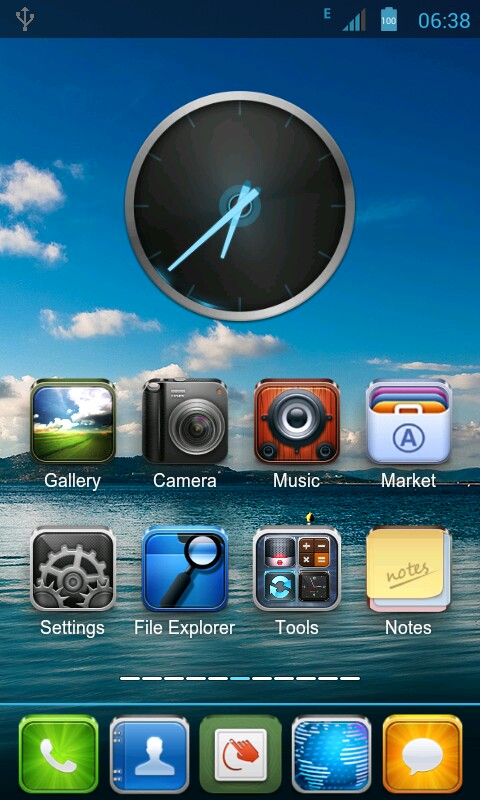
My Home screen
So we go back to MIUI. Imagine my surprise that TJ's MIUI wasn't the only one out there for my CM Magnum. People made forks and ran with it. I mean RAN. I found 4 more other ROMs for my phone and all based on TJ's stuff. TJ is a god!

As for the choosing which on to flash into my phone - I wasn't really that scientific about it. I just basically went for the "eye-candy" factor. I decided on CacingKalung's MIUI 2.2.3 ROM.

It's about 117MB (make that about 120ish if you download the extras which I did.) and it installs flawlessly.

I'm reinstalling my stuff and let's see how this works out while waiting for a stable,working ICS for my phone.

So far, its pretty sweet.


Saturday, February 11, 2012

Adb can't detect my Android Phone. Damn.

So you open a command line and type in adb devices and, guess what, it can't detect your Android phone. This could be because of a variety of reasons like you installed a custom ROM. In any case, adb can't detect your device. Fortunately, the fix is just to install a driver. The bad part is the phone manufacturers sometimes don't post their USB drivers on the net.

How do we fix this?

1. Identify who really makes your phone. Like mine, which is sold as the Cherry Mobile Magnum HD but its actually a Foxconn phone. Do a google search or a lsusb command if your running a Linux box. You should be able then to get the ATTR{idVendor} value.

2. With that, go to this webpage. That should explain how to get your device recognized and help you figure out who made your phone.

3. You should be able to figure out which OEM driver to get.

Install and then you might have to do a reboot. When you get back, your Android phone now should be recognized by running adb devices again. You should be looking at something like below.
adb devices
This is related to my older post: Getting Ubuntu to play nice with your Android device.


Sunday, February 5, 2012

ICS for your Cherry Mobile Magnum

I'm trying out Alpha1 Alpha2  Alpha3 AOSP ICS Rom for Huawei x6 and other FB0 devices. The ROM is cooked by edowar. The ROM is currently Alpha, its working but its still a ways off.

Although, its still alpha it did install painlessly. The procedure is:


1. Downloaded new rom. (.zip) to your SD card
2. Go to 'backup and restore ' and take a backup
3. Reset userdata, cache and dalvik !important
4. Install the zip from SD card
5. Reboot system and you are done

After the install if you already rooted your Cherry Mobile Magnum, it stays rooted. After the reboot, you'll notice that it doesn't have any apps. So get GAPPS and install it following the same procedure for the ROM.

Unfortunately the ROM, doesn't have support for the camera and WIFI yet. Edowar and team are still working on it. And they as nice as the ICS rom is to look at, they don't have an ETA.

Despite of the shortcomings, my preview of the ICS rom has had me convinced that to wait for a release. From what I can see, the ROM is pretty stable (1 reboot for the week I had it) and is choke full of eye candy.

Can't wait!

Monday, November 28, 2011

All I want for Christmas is a XiaoMi

You simply can't knock it. This new Android phone from Meizu is off the hook! Spec-wise its gorgeous for only $310 bucks. That's about P13,500 in my pesos.

You will admit that it looks like an iPhone and that's what exactly its makers want it. The iPhone 4s is just weak if you do a side-by-side comparison.

The iPhone runs on a A5 dual core clocked at 800MHz. The Xiaomi run a Cortex-A8 dual core at 1.5Ghz. Xiaomi 1, iPhone 0.

Internal RAM? iPhone 500MB; Xiaomi 1GB. Xiaomi 2, iPhone 0.

The iPhone has a capacitive 3.5inch touch screen while the Xiaomi has 4inches. Xiaomi 3, iPhone 0.

The Xiaomi has this massive 1930mAh battery. I forgot what iPhone has on it but I will bet it running a standard 1430 mAh. Xiaomi 4, iPhone 0.

And please don't make get started on the price. We all already know that the iPhone is like 29k. How can you beat 13.5k phone with better or equivalent hardware?

Heck, the manufacturer is also promising that by January, Ice Cream Sandwich build will be available. FTW!

So for Christmas, unless your a fanboy, skip the iPhone.

For a more in-depth review, read this.

Anyone want to buy a Cherry Mobile MagnumHD?

Thursday, November 17, 2011

CM Magnum HD + MIUI = iDroid

MIUI Home screen
I bought my Cherry Mobile Magnum HD about about a year ago and if you have been following this blog, you'll remember that I installed and been using the Welcomm ROM. The Welcomm ROM has served me well but time to look for another.

Enter the MIUI.

Now MIUI is a custom Android ROM. The most striking feature is its UI. Its very reminiscent of a iPhone's user interface. That's why I sometimes confuse people when I tell them that I have an iDroid. *big grin*

Now, you will notice that in the official MIUI webpage that the Cherry Mobile Magnum (or its variants) are not support. That's because it isn't. I'm using a modified MIUI ROM by an Indonesian guy named TJ_Style. He hangs around the andro-id.net website.

To get your grubby hands on the rom, you'll have to register to the andro-id.net forum. Just run the site thru a translator since most of the post is in Indonesian.

Also, you'll need to get that custom CWM recovery for your phone so you can install the ROM and get superuser rights. That shouldn't to hard.

Anyway, here's a couple more screenshots of my newly flashed Cherry Mobile Magnum:


Friday, September 23, 2011

Getting Ubuntu to play nice with your Android phone

Doing Android app testing on virtual devices isn't really that bad but it aint the good either. It's always much, much better to test that app on a real device.

But Ubuntu (and possible the other *nixs) doesn't recognize your Android phone. You instead get something like this:

$ adb devices
List of devices attached
???????????? no permissions

Unfortunately this is easily fixed. All you have to do is to create a file in the /etc/udev/rules.d directory which contains one (1) line.
Now, what that line is depends on what your phone is. You can figure that one out by using this command:

$ lsusb

And if you haven't connected your phone via the USB before your typed in the command then pat yourself in the back because your are just as brain dead as the rest of the world.
lsusb output
At any rate, you'll notice that my phone is on Bus 002 and the Vendor ID is "0489" and the Product ID is "c000". Remember these values.

Now, lets make the file:
$ sudo gedit /etc/udev/rules.d/51-android.rules
And then, type in the following line: 
SUBSYSTEM=="usb",ATTRS{idVendor}=="0489",ATTRS{idProduct}=="c000",MODE="0666" 
All that's left then is to restart udev. Some devices will require you to disconnect and reconnect them to be recognized.
$ sudo restart udev
To check if your phone is now recognized.
$ adb devices

Monday, September 19, 2011

Rooting your CM Magnum again

Ok, so you had to update your CM Magnum to Gingerbread via the official Cherry Mobile ROM. This will basically "unroot" your already rooted phone and bring it to 2.3.4 or something. I know its been months since then but I have been doing stuff. I do have a life.

But that still brings us back to the issue at hand, how do I root my Magnum, Ideos X6, etc. again? OK, I can answer that but remember,

I. Will. Laugh. At. You(twice as hard). If. You. Blame. Me. If. You. Brick. Your. Phone.

 So, as far as I know, these don't work:
How do I know? Duh, I tried them of course.
The only one that I have verified that works is tj_styles CWM recovery procedure. Najmods has posted the procedure here.

But if you are too lazy to open a new tab (sheesh...) then here is the procedure:

AWRRR! Walk the Plank, Android!
First step: Replace original recovery with ClockWorkmod Recovery
1. Download ClockWorkMod Recovery
2. Put the device in download mode (Power+Vol Up) and connect to PC,
and the PC will recognize the device as Removable Disc/Storage open it and you will find FIH > Image folder and select recovery.img, copy it anywhere to your PC as backup just in case if anything go wrong
3. Replace recovery.img in 'image' folder with recovery.img inside the Clockworkmod Recovery v4.0.0.9 you download and extracted earlier
4. Disconnect device from PC, open up the battery and reboot.

Second step (DO FIRST STEP FIRST): Rooting the phone
1. Download Su 2.3.6.3 signed.zip and put it in sdcard (but don't put it in any folder)
2. Put the device in recovery mode (Power+Vol Up & Vol Down)
3. Select "install zip from sdcard" and select "Choose zip from sdcard" and search for 'Su 2.3.6.3 signed.zip' and click install.
4. Select "back" and click "reboot system now"

Now to install busybox and do something really stupid/cool like put a perl/ruby/whatever interpreter in my phone. Why install a perl/ruby/whatever interpreter in my phone, you ask? Because I can.

What is your excuse?

Wednesday, August 17, 2011

And then one day....CM7 came

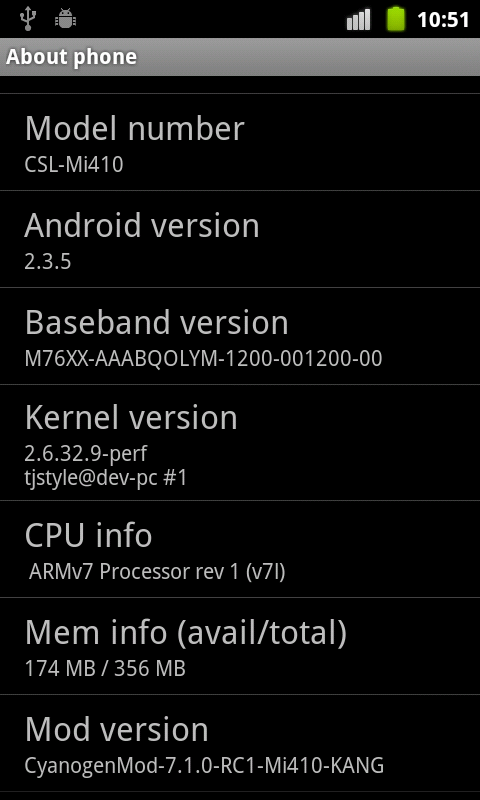
Yes you read that right! CyanogenMod 7.1.0 can now be installed on your Cherry Mobile MagnumHD and I have pictures to prove it!

Well...its not exactly my phone as of yet. I pulled that one from the XDA-Developers site. But it shows that you can now install Cyanogen on your Magnum. The CSL-Mi410 is basically the same phone as the CM-MagnumHD.

For the full set of images proving this fact go here.

As for me, I'm waiting for a bit. The images were put up on August 13, 4 days before this post. I'm taking a see and wait approach.

I'll probably try it out this weekend or something.

*BIG GRIN*

Monday, June 20, 2011

CM's update and their s****** instructions! AMP!

Last week Cherry Mobile just release their update for the MagnumHD. Thanks to Aryan Limjap for the shoutout telling me about it. Its a nb0 file about 160MB which uncompressed to about 402MB. Sweet, right? Screw that, they goof the instructions.

They said to download the file, and copy it into your SD card. No problem unless your one of those asses who didn't buy a SD card or believed he didn't need one. And if you couldn't afford one, then you might be simple be screwed. Fine lets move on.

Next, they said to enter bootloader mode - done by pressing and holding the volume up + down + power buttons. Now, they didn't explicitly say to hold all three buttons down at the same time. Unless, you're like me, you'd be forgiven if you thought that you should press and hold the volume up then down and then power in sequence. But then again...You're such a newb.


Now, you should Press ‘Home’key to show the update utility. Use the volume buttons to select the option “Download nb0 from SD card”. I think this is where it gets scary for you tadpoles. You should see a bunch of text popping up. Now if it says something to the effect that is was successful then no worries. But if not, then you'll have to do an extra step.

You have to rename that stupid file: FB0-318B-0-5019-A01.nb0 to say firmware.nb0. After you have rename it just re-enter the bootloader mode. And redo the whole "Download nb0 from SD card" procedure.

BTW, make sure that you have atleast 70% battery when doing this. We don't want any bricked CM Magnums, do we?

One more thing, by doing this, you will need to root your phone again. Yeah, I know, what at bitch.

Tuesday, March 29, 2011

Fixing that buggy stock ROM on your CM MagnumHD

My phone's
home pane
For those who are lucky enough to get Cherry Mobile's MagnumHD, we all can agree that the stock ROM f***** sucks. I really mean it sucks - the random restarts, the FCs, context buttons stop responding and the the most annoying is the screen times out (i.e. blacks out) when you make a phone call. So, being a geek, I will have none of this and I started scheming (along with Aryan Limjap which BTW, provides us the lovely images attached to this post) to get a fix into my CM Magnum. Warranty be damn!

System Pane
And what do you know, the Indians Indonesians came up with a better ROM. As you can see I'm now running a Wellcom-A99 ROM on my CM MagnumHD. I can tell you it runs better, cooler and longer. Also I would like to point out the Android version 2.2.2. I will still flash this thing to 2.3 when it comes out. But trust me on this, MY PHONE IS RUNNING BETTER on this ROM.

You might wonder how is this possible, then you apparently didn't inherit enough "bright" genes from your parents. But to get my point moving, CM MagnumHD is OEM phone from Foxconn and is rebranded in a lot of other countries.
  • Philippines - CM MagnumHD
  • China - Huawei Ideos X6
  • US - Viewsonic ViewPad 4
  • India Indonesia - Wellcom A99
  • India - OliveSmart V-S300
With the Apps
And that is why children, I can stick an Wellcom A99 ROM on my CM MagnumHD. But still want to beat this into your head, if you are doing this you are voiding your phone's warranty. As for me, I already voided mine when I rooted my phone. Refer to the screenshot with the apps.

So if you understand what I am telling you and you still want to flash in the Welcomm ROM then click here. Just scroll down and look for the link. The download is about 200MB. 

And btw, did I mention to you all that there's still a slight chance that this will put your phone into a boot-loop or (worse) brick your phone?

Edit: Mecha50 corrected me that the A99 ROM is Indonesian. My bad.

Thursday, March 3, 2011

Your Nexus One or Moto Droid suck balls

Screenshot after benchmarking
with Quadrant
Being the idiot that I am, I got sucked into a "hot" debate on which Android device is faster. And as we all know, everyone wants to say that they have the "better" device. Well, they can all kiss my phone's ass! So talked about it and we agreed to use a benchmarking tool and get the bottom of this. We all got this benchmarking tool called Quadrant from the Market. It free by the way. And well all agreed to get the Standard Edition. This would be the 1.1.7 version with a build date of Feb 1, 2011.

And let the benchmarking begin! And my Cherry Mobile Magnum HD kicks all their asses! And then some!

The graph does not lie!

"Screw that. The results your getting must be a fluke." they said, I then replied: "I don't know. Am I the one bending over and getting screwed?"

I couldn't begin to tell you how big my grin was walking away.

hehehehehe!