Showing posts with label troubleshooting. Show all posts

Wednesday, March 19, 2025

Working with server and browser time


Consider the image:

  • A is showing 8 hours ago because the server time is in a different time zone (TZ) to the TZ of the browser
  • B is what we want because that's the browser or local time which is computed with the TZ offset.

In the "olden" times, getting the browser or local datetime in reference to a server's datetime was to use a library like moment.js. But browsers have come a long way.

Actually code:


const offsetLocalTime = new Date(dateStringFromServer);

offsetLocalTime.setHours(
  offsetLocalTime.getHours() - offsetLocalTime.getTimezoneOffset() / 60,
);

The trick is the getTimezoneoffset() function. But it's not a silver bullet because:

  • It only works with UTC or ISO dates. Remember, that UTC and ISO dates are "time keeping" standards NOT A FORMAT. Although, UTC and ISO are slightly different ways to track time, usually that's not a problem since the different between the two is a fraction of a second - which is only really significant if you're working in an ultra precise environment.
  • It "guesses" the time zone of the OS so if the user configured his TZ incorrectly, then the computation is also off.


Tuesday, January 21, 2025

Fix Losing your HD mounts on RaspberryPI with a Orico 9558u3

If you're anything like me, having a lot of old, mismatched 3.5" drives, you'd probably decide on getting a n USB enclosure like the Orico 9558u3, plug it into your RaspberryPI, edit your FSTAB to automount, then setup Samba to file share. 

Well, that works until the Orico 9558u3 decides to sleep to save power when there's no drive activity. It can't help itself BECAUSE it's a feature. Now you lose access to your mount drives. Now what?

Lucky, we're in linux and we can simply fake drive activity and set it on a schedule.

We simply run a cronjob every 5 minutes to "touch" the disk. Hehehe.

Open your CronTab:

$ sudo crontab -e

With your text editor (nano or vi), add the following line:

$ */5 * * * * /bin/touch /your/hdd/mnt/here &>/dev/null

Add more lines for each drive you want to keep awake.

Lastly, restart your crontab.

$ sudo systemctl restart cron
$ sudo systemctl status cron


Friday, November 29, 2024

Doing a git clone within a LAN without Internet

On the laptop where the repo to be clone is hosted, we run the command git daemon from the terminal.

Sample command on the HOST:

 $ git daemon --base-path=<path_to_folder_containing_project_folder> --export-all --verbose  

<path_to_folder_containing_project> is the folder containing your projects folders, it will provide all projects under that folder. You're basically looking for the project folder containing the .git folder.

The client:

 $ git clone git://<local ip>/<project name>  

It's that easy but do note that the cloned repo's origin will be pointing to the HOST IP, so you need to use git remote set-url origin to point it to a different IP or origin. 

We might want to run git daemon with the --verbose option to get more details in case we run into problems.

If we are getting connection problems, you might have to check Firewall settings to allow the connection.


Reference

* https://stackoverflow.com/questions/5200181/how-to-git-clone-a-repo-in-windows-from-other-pc-within-the-lan


Wednesday, January 11, 2023

Notes for Setting up Django for ASGI with Gunicorn, Uvicorn, Docker and Websockets

Gunicorn is a robust web server that has monitoring and automatic restarts. Perfect for production deployments. 

Uvicorn is an ASGI server based on uvloop and httptools, with emphasis on speed. 

ASGI means Asynchronous Server Gateway Interface intended for async-capable Python web servers, frameworks and apps. The other side of the coin is WSGI. TL:DR: ASGI = asynchronous, WSGI=synchronous

Installing

$ pip install gunicorn uvicorn[standard]

Install unicorn[standard] if you are using websockets. Expect to do this if you are using django channels.


Running with Docker

I assuming that the base image is `python:latest`. The command should look like:

$ gunicorn my_project.asgi:application -b 0.0.0.0:8000 --reload -k uvicorn.workers.UvicornWorker 

This binds the ports. I'm also using a nginx service configured with an upstream service pointing to the 8000 port on my django app container.

Why not daphne server?

The daphne server doesn't support a reload function which is a pain for local web development. See: https://github.com/django/daphne/issues/9

Thursday, November 17, 2022

Fixing bad video files with ffmpeg

FFmpeg is an open-source collection of tools for processing video and audio files. It allows to convert video and audio files from one format into another, resize videos, stream audio and video, and perform various other actions with media files.

FFmpeg is quite easy to interact with Python via bindings but it's also a CLI which what I used to fixed bad video. 

The simplest command we can do:

ffmpeg -err_detect ignore_err -i video.mkv -c copy video_fixed.mkv

A more involved command:

ffmpeg -vcodec mpeg4 -b:v 7561k -qscale:v 2 -acodec aac -ac 2 -async 1 -strict experimental ./video_fixed.mp4 -threads 0 -i damage_file.mp4

This one re-encodes while trying to fix the video. This one also take longer to run.


Thursday, October 6, 2022

Django utils and misleading timezones

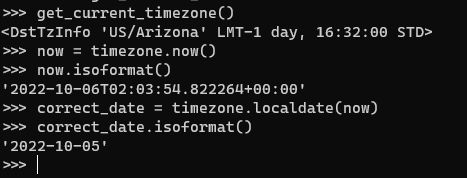
Date and time are difficult things to get right in web programming. It has many factors affecting it like the server time zone, the users' time zone, a serverless function calling from a different time zone, you set `USE_TZ` to true in your django settings, etc. 

I had an interesting problem where my django site had to use `US/Arizona` as the default time zone. At first glance, using `timezone.now()` was enough to account for the time zone usage.

The interesting part come when you drill down into the timezone class; especially the now() method. The 2nd bullet says that now() will always return times in UTC REGARDLESS of the value of TIME_ZONE. So you get values that are 1 day ahead or behind depending on your time zone. Mine, was 1 day ahead:


I was expecting that the now() method would return a `2022-10-05` date (you can ignore the time component). Apparently, the now() method must be converted to the correct local date via the localdate() method. 


There's also a localtime() method if you need to get the correct local time for the time zone.


Tuesday, June 14, 2022

Enforce row count limits on ManyToManyField rows in Django models

I had a requirement where ModelA needs to limit how many ModelBs it can have. They are linked via a ManyToManyField using a through model.

It looks like this:

 class ModelA(models.Model):  
   name = models.Charfield(max_length=255)  
   b_limit = models.PositiveSmallIntegerField(help_text="Max number of Bs we can have")  
   model_b_set = models.ManyToManyFields('ModelB', through="ABJoinTable")  

 class ModelB(models.Model):  
   some_field = models.Charfield(max_length=255)    
   model_a_set = models.ManyToManyFields('ModelA', through="ABJoinTable")  

 class ABJoinTable(models.Model):   
   model_a = models.ForeignKey("ModelA", on_delete=models.CASCADE)  
   model_b = models.ForeignKey("ModelB", on_delete=models.CASCADE)  
   is_suspended = models.BooleanField(default=False)  

The through model just contains extra information is NOT the key to enforcing the rule. Remember, we want to limit how many ModelB rows ModelA can have. How many ModelB's ModelA can have it controlled by the "b_limit" field. 

The solution is to use the m2m_changed signal. 

from django.db.models.signals import m2m_changed  
from django.core.exceptions import ValidationError

def enforce_modelA_B_limit(sender, **kwargs):  
   modelA = kwargs['instance']  
   if modelA.model_b_set.count() >= modelA.b_limit:  
    raise ValidationError("ModelA has too many ModelBs")  

m2m_changed.connect(enforce_modelA_B_limit, sender=ModelA.model_b_set.through)  

You can place this wherever a signal function is valid. I just placed mine in the same place where the models are declared.

Why a signal?

If your gut feeling was to override the `save()` or `clean()` methods then those won't work. You cannot check the count for the ManyToManyField until you have save the primary model - ModelA. You'll get an exception saying something like: `ModelA needs to have a value for field "id" before this many-to-many relationship can be used.`.

Testing Tip

In writing a test case for this, you can use the `self.assertRaises()` context to catch the error. It's bad practice if you do a `try-catch` block to see if the rule works. The test case would look like this:

 def test_modelA_B_limit_rule(self):  
   # we assume that a setUpTestData() method exist  
   # we also assume that ModelA is limited to 1 ModelB so adding a second ModelB should throw an
   # exception
   sample_b = ModelB.objects.create(some_field="test")  
   modelA_instance = ModelA.objects.get(pk=1)  
   with self.assertRaises(ValidationError):  
     modelA_instance.model_b_set.add(sample_b) # should throw  

There's nothing to change if you have Django Rest Framework project. Your API will throw a 400 error if they violate the limit.

Refs: https://stackoverflow.com/questions/20203806/limit-maximum-choices-of-manytomanyfield

Thursday, June 9, 2022

Fixing a Django drf-yasg "serializer_class required" AssertionError

Sometimes you have an API view (ie. GenericAPIView) class without a serializer. This causes the drf-yasg generator to throw an AssertionError exception saying class should either include a 'serializer_class' attribute, or override the 'get_serializer_class()' method.

You can fix this by adding the following to the view class:

 def get_serializer(self, *args, **kwargs):  
     pass  
 def get_serializer_class(self):  
     pass  

This should pass the drf-yasg serializer check.


Reference

Monday, December 6, 2021

When Django 4.00rc-1, pipenv, djstripe and docker decide to pull the rug from under you

Sometimes you just need to rebuild your docker containers and that's where the problem started. When my containers came back, it wouldn't start because of a TypeError being thrown. 

  File "/usr/local/lib/python3.8/site-packages/djstripe/models/__init__.py", line 25, in <module>  
   from .core import (  
  File "/usr/local/lib/python3.8/site-packages/djstripe/models/core.py", line 30, in <module>  
   from ..signals import WEBHOOK_SIGNALS  
  File "/usr/local/lib/python3.8/site-packages/djstripe/signals.py", line 8, in <module>  
   webhook_processing_error = Signal(providing_args=["data", "exception"])  
 TypeError: __init__() got an unexpected keyword argument 'providing_args'  

Hmmm...

So I reviewed what was running on my docker containers. I had 4 containers: django with pipenv, celery, rabbitmq, and postgres. I ruled out postgres and rabbitmq out of the gate since the error is clearly a Python error. 

Focusing on the django container, I eventually found the error - took me the whole afternoon. At first I thought it was a docker bug but it wasn't. It was because of how pipenv was getting and installing the packages. Let me explain.

Our pipenv file that had django was set to install the latest version so it was written as django = "*". When I rebuilt the container and the dockerfile executed it downloaded the latest version of django which was 4.00rc-1.

The fix was to set the version: django = "~=3.2".

The moral of the story is don't blindly set your pipenv file to "*" and instead be explicit with the versions. Luckily pipenv does support semantic versioning meaning it will install minor versions of django 3.2 like 3.2.2 but not Django 4.0.


Friday, May 7, 2021

Django tests on an Azure Pipeline

Source: https://gist.github.com/killertilapia/c9e7635807e596f20a16123ceed9c48d

Running Django tests on Azure is a mix bag of confusing documentation and outdated examples. When We did this I can't shake the feeling that Python was a second class citizen in Azure. 

Stuff that bugged me OR caught me flat-footed


1. Environment Variables. I get that having many options supported for declaring variables is cool but I wish Azure followed one of Python's tenets and that's "There should be one— and preferably only one —obvious way to do it.!". 

Another thing that bugged me was how Azure allows declaring variables for the pipeline: why allow a `.` (period) in the declaration then explain that gets replacement with `_` (underscore) and the rest of the text capitalized under certain conditions. 

Why couldn't we just stayed with YML? I never did like idea of "scripts within scripts". Again, Python's tenets: "There should be one— and preferably only one —obvious way to do it.!". 

2. vmImage version. This isn't really an Azure issue but more of a Python test issue. In order to run the tests I wanted: 

python manage.py test --testrunner xmlrunner.extra.djangotestrunner.XMLTestRunner --no-input --settings=settings.testing

I had to create an environment for the test to run on. So step before this was to install my environment prerequisites which is directly influenced by the vmImage version. At first, I was using: ubuntu-16.08 which was causing a Django migration error due to unsupported feature. We quickly figured out that the sqlite version that came with 16.08 was older. We also had to bump up the python version to 3.8. 


If you're basic and prefer to use a UI then Azure is probably your thing. But an old school guy like me who prefers automated scripts, Azure's documentation and philosophy to cloud is an inconvenience. 

Monday, October 28, 2019

Keeping a Forked Repo up to date

Keep your fork up to date by tracking the original "upstream" repo that you forked. To do this, you'll need to add a remote:

# Add 'upstream' repo to list of remotes
git remote add upstream https://github.com/UPSTREAM-USER/ORIGINAL-PROJECT.git

# Verify the new remote named 'upstream'
git remote -v


Whenever you want to update your fork with the latest upstream changes, you'll need to first fetch the upstream repo's branches and latest commits to bring them into your repository:

# Fetch from upstream remote
git fetch upstream

# View all branches, including those from upstream
git branch -va


Now, checkout your own master branch and merge the upstream repo's master branch:

# Checkout your master branch and merge upstream
git checkout master
git merge upstream/master


If there are no unique commits on the local master branch, git will simply perform a fast-forward. Now, your local master branch is up-to-date with everything modified upstream.

Thursday, August 29, 2019

Handling non-well-formed HTML in Scrapy with BeautifulSoup

With Scrapy, we can deal with non-well-formed HTML is many ways. This is just one of them.

BeautifulSoup has a pretty nifty feature where it tries to fix bad HTML like replacing missing tags. So if we put BeautifulSoup in the middle then whatever we get from a site is fixed before we parse it with Scrapy.

Fortunately, all we have to do is pip install Alecxe's scrapy-beautifulsoup middleware.

pip install scrapy-beautifulsoup

Then we configure Scrapy to use it from settings.py:

DOWNLOADER_MIDDLEWARES = {
    'scrapy_beautifulsoup.middleware.BeautifulSoupMiddleware': 400
}

BeautifulSoup comes with a default parser named 'html.parse'. We can change it.

BEAUTIFULSOUP_PARSER = "html5lib"  # or BEAUTIFULSOUP_PARSER = "lxml"

HTML5 is the better parser IMO but it has to be installed separately.
 
pip install html5lib

Wednesday, June 26, 2019

Gracefully dealing with different SSH keys for different domains or accounts

This problem often happens when you mix your personal ssh keys along with your company's and you work off a single workstation or laptop.

Even if the user and host are the same, they can still be distinguished in the ~/.ssh/config.

Host gitlab.com
  HostName git.company.com
  User git
  IdentityFile /home/whoever/.ssh/id_rsa.alice
  IdentitiesOnly yes

Host kitlab.com
  HostName git.company.com
  User git
  IdentityFile /home/whoever/.ssh/id_dsa.bob
  IdentitiesOnly yes


Then you can use gitlab.com and kitlab.com instead of the hostname in your git remote.

git remote add g-origin git@gitlab.com:whatever.git
git remote add k-origin git@kitlab.com:whatever.git


You probably want to include the option IdentitiesOnly yes to prevent the use of default ids.

Ref: https://blog.developer.atlassian.com/different-ssh-keys-multiple-bitbucket-accounts/

Wednesday, April 10, 2019

Troubleshooting Cmder Terminal in Visual Studio Code

If you didn't know, you can customize the terminal for VScode. In my case, I wanted to use cmder because Windows terminals suck; both of them cmd and powershell.

Fortunately, cmder has a guide for integrating it to VScode.

The interesting thing is when I tried using it with my Python workflow which includes virtual environements via Pipenv and I ran into a couple of problems.

Problem #1 Missing posh-git

Symptom Spits out a warning telling you that you are missing posh-git - 'Install-Module posh-git' and restart cmder"

Fix #1 Run from the admin level PShell:  Install-Module posh-git

You might also get a error saying it might have an overlap with some other extension like say 'TabExpansion'.

Fix #2 Either run Fix#1 with the -AllowClobber or -Force option OR run it with a -Scope option: Install-Module posh-git -Scope CurrentUser

----

Problem #2 FunctionNotWritable (Cannot write to function prompt..)

Symptom Spits out the error; Also notice that your terminal prompt isn't prefixed by the activated virtual environment. Only happens when your doing Python with virtual environments.

Fix #1 Remove or comment out the -Options ReadOnly option on the cmder profile.ps1. Details here.


Thursday, February 14, 2019

Random quirk with Windows, Git and an executable Bash script

The context of the problem was that I was making a Docker container with Linux image. It's to be deployed to a cloud service and I'm working from Windows machine. Of course the container would need code to run. To facilitate this, I wrote a basic bash script - scrape.sh.

On Windows, the scrape.sh file already is executable
For disclosure, I'm working with Scrapy here.

From my Windows terminal, the scrape.sh script seems to be already executable. I thought I was fine and I did the whole git cycle of add, commit and push.

The problem shows up when the container tries to run. It will spit out an error saying that it can't execute the scrape.sh script because it's lacking rights. It seems that git commits my bash script as an ordinary file not as an executable despite what I saw on the Windows terminal. The fix though was quite easy.


$ git add --chmod=+x -- afile
$ git commit -m"afile is now executable"


Relevant link:


Friday, January 4, 2019

Installing Scrapy on Windows

Data is the new oil they say and you want to start scraping sites for data. Fine! And since you are a Python developer you'd want to use Scrapy. Unfortunately for you you are a Windows user and errors abound.

Anyhow, you run pip install scrapy and you run into an error:

Scrapy failing to pip install in Windows

The error here is one of dependencies of Scrapy which is Twisted. Fortunately this is fixable.

The first thing we're going to do is download the "binary" wheel file for Twisted. There's a trick here though, YOU MUST DOWNLOAD THE CORRECT ONE THAT MATCHES YOUR PYTHON VERSION. So if you are on Python 3.6, you're looking for something that reads like Twisted-18.9.0-cp36-cp36m-win32.whl; if Python 3.7 then you're looking for something with cp37-cp37m. You get the idea.

The 32-bit or 64-bit probably also matters but I didn't test it.

Once you have that file downloaded somewhere, you can then do a pip install .

Try installing Scrapy again and you should be good to go.

As an added bonus, this seems to fix other Python packages in Windows that require the Visual Studio Windows C++ SDK like the mysql-python.

Tip for Pipenv users:

1. pipenv shell
2. pip install
3. pipenv sync


Friday, August 11, 2017

NativeScript and that "status 200 url null" error

This error confused me while developing with NativeScript trying to do a rest api call. Without digging thru the error object, you only get: "Response with status: 200  for URL: null" for the error text. Not exactly useful.

I then had to run "tns debug android" and dig thru the error object by doing adding a "json()" method call to it. I then got a more verbose error message. Something like:

"Error: java.net.ConnectException: failed to connect to localhost/127.0.0.1 (port 8000): connect failed: ECONNREFUSED (Connection refused)"

The chrome devtools also was cryptic only saying that the rest api call "Stalled".

Ok. So I then visited StackOverflow looking for a solution. No dice. Until, I realized that I'm doing development using an android emulator which is basically a virtual machine. And being a virtual machine calling 'localhost' or 127.0.0.1 is calling itself. The address is loopback address of the vm NOT my machine. No wonder the rest api call was failing. Fortunately, the android emulator networking is setup to work with localhost development.

The solution is to just change the rest api call from 'http://localhost/api' to http://10.0.2.2/api'.

Now it works.

For the curious, my rest api server is a Django Rest Framework app running locally.


Friday, June 30, 2017

Fixing CERTIFICATE_VERIFY_FAILED error on Macs with Python3

There's this annoying thing where Requests, a very popular Python library for working the internet doesn't work because of SSL certificates not being trusted.

This whole thing apparently is caused by OSX and Python3 having no certificates and can't validate SSL connections! This information is sort of hidden away in this itty bitty readme file on the certifi module which then pointed me to the readme file in python3. What. The. Fuck.

There, you'll know that for Python 3.6 on OSX, it requires a post-install step, which installs the certifi package of certificates. This is documented in the ReadMe, which you should find at /Applications/Python\ 3.6/ReadMe.rtf

The ReadMe will have you run this post-install script, which just installs certifi: 

/Applications/Python\ 3.6/Install\ Certificates.command

I should read the release notes for Python3 more closely.  

Wednesday, June 7, 2017

Dealing with outdated or abandoned pypi modules with VCS install

So I was using a small, simple but working Paypal module which unfortunately was forgotten or abandon by the original author. It was working on my Django 1.5 site up until I needed to upgrade to Django 1.10 because of the other modules. Also for security and stability reasons but that's another story for another time.

Fortunately, this Paypal module wasn't "super" broken. The errors were just a couple of lines in the templates and a function named patterns() from django.url.conf - urls.py.

This leads into a couple of solutions:

1. I could copy-pasta the code and turn it into a internal django app with the fixes.

2. I could fork it, fix and then setup by own pypi server.

3. I could find out if someone fixed this already and take it from there.

Of course, I'd pick #3 - Programmer. So, lazy. Look it up.

I was lucky to found out that someone has fixed all the issues and got it running on Django 1.10. All that's left is to fork his repo and install it into my virtual environment.

It's simple because pip already supports installing modules from a VCS.

$ pip install git+https://github.com/killertilapia/fixed-forked-project

If you need install a certain branch do this instead

$ pip install git+https://github.com/killertilapia/fixed-forked-project@branch

This also works with other VCS like Mercurial (hg+https), Bazaar (bzr+https) or for-fuck-sakes why! - SVN (svn+https).

Wednesday, May 31, 2017

Windows Python 3.6, VS2017 and the case of the missing basetsd.h

So you decided to join the Python 3 bandwagon on Windows with your new shiny Visual Studio. And then you start work on a fresh virtual environment and then you do a pip install or something. Sometimes, you'll end up with a compile error just like this:
WTF is this missing 'basetsd.h' file
You'll google this and end up with one of many stackoverflow topics stating you must install Visual Studio 2015 or some SDK.

Fuck that and save your time. You can do better because a programmer named Dimitri Janczak found a solution that works and I can confirm it works. 

The solution is as follows:

1. Install or update setuptools (> 34.0). Do note that setuptools is sort of tied with your version of Pip. So you might have to do: python -m pip install -U pip setuptools

2. The next step is to pick the correct command-line environment. What?! I know right, Visual Studio comes with multiple command prompts. 


Select the appropriate Native Tools Command prompt. Navigate to the project folder. Activate the virtual environment and do what you did last before you encountered the compile error.

If you goes to plan then you should get a successful result.