Showing posts with label programming. Show all posts

Friday, March 13, 2026

Programming in 2026 with Artificial Intelligence tools

Some context:

I work on mostly legacy applications. Some are gigantic mono-repos, some are running  on Python 2 and some are a mash of half-solutions and ideas (like some of the UI is in JavaScript and the other half is TypeScript; made to work with a kludgy, brittle build script).

I've been using mostly Cursor. It was provided by my employer and I'm familiar with it's VScode editor. I also installed their CLI for Windows Terminal. I've tried other stuff like Co-pilot (not a fan, it was too intrusive for me) and Gemini.

Here's a couple of things that I've learn so far:

1. The Cursor agent for coding will get you almost there, I'd say 90% of the way. They will often misinterpret some nuance but I think that's probably more of the prompt used rather than the agent. You can "chat" with the agent to get what you want but be aware that has limitations - ie. context. 

2. Speaking of prompts, the Cursor agent works better if you can provide more detailed instructions rather than letting it guess. Too often, if you provide a vague enough prompt, it will use the latest or most "popular" approach. For example, it picked Set collection to use on a JS codebase prior to 2015. Sets are only supported by ECMAScript 6 which was released on 2015. But then again, the project code base was a mess of shims and Babel scripts. 

3. Setting up a project especially long-term ones, need some time and thought. For example, Cursor supports things like Rules to provide project to system-level instructions. You can add hooks to do stuff like run formatters or scan for bad practices like hard-coding secrets or API keys. The small downside for this is that senior developers have to make conscious decisions for these things because you can include these rules and hooks in the codebase. 

4. I don't like the feeling of giving the Cursor agent "full-control" of my PC outside of the VScode editor like issuing Git commands or doing az or gcloud calls. I didn't auto-allow those types of commands. If the agent wants to execute those, I have to manually allow. 

Personally, I still don't fully trust AI in doing my job. Don't get it twisted though, my job is to solve business problems and NOT writing code. Writing code is just a side effect. But not fully trusting AI tools doesn't mean not using them. It just means using or viewing them differently from what social media or the "tech bros" are saying.


Wednesday, March 19, 2025

Working with server and browser time


Consider the image:

  • A is showing 8 hours ago because the server time is in a different time zone (TZ) to the TZ of the browser
  • B is what we want because that's the browser or local time which is computed with the TZ offset.

In the "olden" times, getting the browser or local datetime in reference to a server's datetime was to use a library like moment.js. But browsers have come a long way.

Actually code:


const offsetLocalTime = new Date(dateStringFromServer);

offsetLocalTime.setHours(
  offsetLocalTime.getHours() - offsetLocalTime.getTimezoneOffset() / 60,
);

The trick is the getTimezoneoffset() function. But it's not a silver bullet because:

  • It only works with UTC or ISO dates. Remember, that UTC and ISO dates are "time keeping" standards NOT A FORMAT. Although, UTC and ISO are slightly different ways to track time, usually that's not a problem since the different between the two is a fraction of a second - which is only really significant if you're working in an ultra precise environment.
  • It "guesses" the time zone of the OS so if the user configured his TZ incorrectly, then the computation is also off.


Friday, November 29, 2024

Doing a git clone within a LAN without Internet

On the laptop where the repo to be clone is hosted, we run the command git daemon from the terminal.

Sample command on the HOST:

 $ git daemon --base-path=<path_to_folder_containing_project_folder> --export-all --verbose  

<path_to_folder_containing_project> is the folder containing your projects folders, it will provide all projects under that folder. You're basically looking for the project folder containing the .git folder.

The client:

 $ git clone git://<local ip>/<project name>  

It's that easy but do note that the cloned repo's origin will be pointing to the HOST IP, so you need to use git remote set-url origin to point it to a different IP or origin. 

We might want to run git daemon with the --verbose option to get more details in case we run into problems.

If we are getting connection problems, you might have to check Firewall settings to allow the connection.


Reference

* https://stackoverflow.com/questions/5200181/how-to-git-clone-a-repo-in-windows-from-other-pc-within-the-lan


Monday, July 10, 2023

When you need to open 3 (or more) files in Python3

The problem is I needed to open 3 files:

1. CSV source file to read
2. CSV file to write results on after processing the first file
3. Another CSV file that has metadata resulting from processing the 1st CSV that's different from the 2nd

Solution

There are 2 practical ways to do it. There's a 3rd but it has a very specific use case.

As for Python3, you can basically do this using context managers via the 'with' keyword:


with open('a', 'r') as a_file, open('b', 'w') as b_file, open('c', 'wb') as c_file:    
    do_something()

I believe it this also exist in Python 2.7 but you might need to use the contextlib.nested() function

The other approach is when you need to process files sequentially rather than opening all of them at the same time. Useful if you have variable number of files:

for fname in filenames:
    with open(fname) as f:
        # Process f

You can also use this if you would rather keep the results in memory and only write it to the file when done. 

Reference: 

  • https://stackoverflow.com/questions/4617034/how-can-i-open-multiple-files-using-with-open-in-python

Thursday, March 30, 2023

Notes on Solving Simple Vehicle Routing with Python and Google Maps only

Simple Vehicle Routing is a problem related to finding the "optimum" path between a set of locations. The rub here is dealing with real-world addresses and road data (ie. traffic, condition, etc.). Google documentation (or propaganda) will say this is easy but that's slightly misleading.

What I've learned:

 1. Setting up to use the Google Maps APIs (yes APIs; we are going to use most of the it) needs a billing account or credit card. Although, it will not cost you anything because Google is giving you usd$200 month credit. So unless, you exceed 200 bucks worth of usage, it won't cost you anything BUT it's a good idea to set a limit just in case.

2. Jupyter Notebooks is handy to figure out and test stuff. It's just a little finicky getting it to run. For example:

  • I had to rollback ipywidgets to 7.7.2 from the latest 8.0.9 to get gmaps to work
  • I had to change python versions from 3.11 to 3.9 because scipy was being a bitch when installing ortools. Ortools has dependencys to scipy. Luckily I already use pyenv so this was relatively painless.
Jupyter Notebook running with gmaps, OR-Tools


Next step is figuring out how get what I've learned into a REST API for delivery/pickup app. I thinking, use Starlite + Rethinkdb.

Ref: 
  • https://woolpert.com/managing-simple-vrp-with-google-maps-platform/
  • https://developers.google.com/optimization/routing/vrp
  • https://jupyter-gmaps.readthedocs.io/en/latest/install.html
  • https://stackoverflow.com/questions/72371859/attributeerror-module-collections-has-no-attribute-iterable

Wednesday, January 11, 2023

Notes for Setting up Django for ASGI with Gunicorn, Uvicorn, Docker and Websockets

Gunicorn is a robust web server that has monitoring and automatic restarts. Perfect for production deployments. 

Uvicorn is an ASGI server based on uvloop and httptools, with emphasis on speed. 

ASGI means Asynchronous Server Gateway Interface intended for async-capable Python web servers, frameworks and apps. The other side of the coin is WSGI. TL:DR: ASGI = asynchronous, WSGI=synchronous

Installing

$ pip install gunicorn uvicorn[standard]

Install unicorn[standard] if you are using websockets. Expect to do this if you are using django channels.


Running with Docker

I assuming that the base image is `python:latest`. The command should look like:

$ gunicorn my_project.asgi:application -b 0.0.0.0:8000 --reload -k uvicorn.workers.UvicornWorker 

This binds the ports. I'm also using a nginx service configured with an upstream service pointing to the 8000 port on my django app container.

Why not daphne server?

The daphne server doesn't support a reload function which is a pain for local web development. See: https://github.com/django/daphne/issues/9

Thursday, October 6, 2022

Django utils and misleading timezones

Date and time are difficult things to get right in web programming. It has many factors affecting it like the server time zone, the users' time zone, a serverless function calling from a different time zone, you set `USE_TZ` to true in your django settings, etc. 

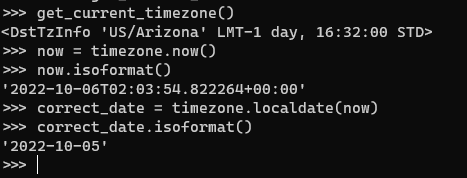
I had an interesting problem where my django site had to use `US/Arizona` as the default time zone. At first glance, using `timezone.now()` was enough to account for the time zone usage.

The interesting part come when you drill down into the timezone class; especially the now() method. The 2nd bullet says that now() will always return times in UTC REGARDLESS of the value of TIME_ZONE. So you get values that are 1 day ahead or behind depending on your time zone. Mine, was 1 day ahead:


I was expecting that the now() method would return a `2022-10-05` date (you can ignore the time component). Apparently, the now() method must be converted to the correct local date via the localdate() method. 


There's also a localtime() method if you need to get the correct local time for the time zone.


Wednesday, August 17, 2022

Flutter + Python = Flet

Flet is this pretty cool framework that allows someone to build an app on web, mobile and desktop quickly. It uses the Flutter framework for the UI stuff to get it to look good and work on any platform. 

It says that its language agnostic but it currently only supports Python. Does that make it a Python framework?

Anyway, I've been playing around with it and I like it. 

Things that I like:

1. Good looking apps created quickly

2. Everything is in Python even the UI; quite similar how Flutter does it, in fact. 

3. Next-to-nothing code change to target different platforms; so, to get a desktop app to run on a web browser is a just a named function parameter

flet.app(target=main) # run it as a desktop
flet.app(target=main, view=flet.WEB_BROWSER) # run it on a web browser/web app

Things that's missing:

1. No hot reload (but it's on the roadmap so that's something to look forward to)

2. Not all of the Flutter widgets are available like the Hero widget


Overall, I'm having a grand old time trying out Flet. 

Tuesday, June 14, 2022

Enforce row count limits on ManyToManyField rows in Django models

I had a requirement where ModelA needs to limit how many ModelBs it can have. They are linked via a ManyToManyField using a through model.

It looks like this:

 class ModelA(models.Model):  
   name = models.Charfield(max_length=255)  
   b_limit = models.PositiveSmallIntegerField(help_text="Max number of Bs we can have")  
   model_b_set = models.ManyToManyFields('ModelB', through="ABJoinTable")  

 class ModelB(models.Model):  
   some_field = models.Charfield(max_length=255)    
   model_a_set = models.ManyToManyFields('ModelA', through="ABJoinTable")  

 class ABJoinTable(models.Model):   
   model_a = models.ForeignKey("ModelA", on_delete=models.CASCADE)  
   model_b = models.ForeignKey("ModelB", on_delete=models.CASCADE)  
   is_suspended = models.BooleanField(default=False)  

The through model just contains extra information is NOT the key to enforcing the rule. Remember, we want to limit how many ModelB rows ModelA can have. How many ModelB's ModelA can have it controlled by the "b_limit" field. 

The solution is to use the m2m_changed signal. 

from django.db.models.signals import m2m_changed  
from django.core.exceptions import ValidationError

def enforce_modelA_B_limit(sender, **kwargs):  
   modelA = kwargs['instance']  
   if modelA.model_b_set.count() >= modelA.b_limit:  
    raise ValidationError("ModelA has too many ModelBs")  

m2m_changed.connect(enforce_modelA_B_limit, sender=ModelA.model_b_set.through)  

You can place this wherever a signal function is valid. I just placed mine in the same place where the models are declared.

Why a signal?

If your gut feeling was to override the `save()` or `clean()` methods then those won't work. You cannot check the count for the ManyToManyField until you have save the primary model - ModelA. You'll get an exception saying something like: `ModelA needs to have a value for field "id" before this many-to-many relationship can be used.`.

Testing Tip

In writing a test case for this, you can use the `self.assertRaises()` context to catch the error. It's bad practice if you do a `try-catch` block to see if the rule works. The test case would look like this:

 def test_modelA_B_limit_rule(self):  
   # we assume that a setUpTestData() method exist  
   # we also assume that ModelA is limited to 1 ModelB so adding a second ModelB should throw an
   # exception
   sample_b = ModelB.objects.create(some_field="test")  
   modelA_instance = ModelA.objects.get(pk=1)  
   with self.assertRaises(ValidationError):  
     modelA_instance.model_b_set.add(sample_b) # should throw  

There's nothing to change if you have Django Rest Framework project. Your API will throw a 400 error if they violate the limit.

Refs: https://stackoverflow.com/questions/20203806/limit-maximum-choices-of-manytomanyfield

Thursday, June 9, 2022

Fixing a Django drf-yasg "serializer_class required" AssertionError

Sometimes you have an API view (ie. GenericAPIView) class without a serializer. This causes the drf-yasg generator to throw an AssertionError exception saying class should either include a 'serializer_class' attribute, or override the 'get_serializer_class()' method.

You can fix this by adding the following to the view class:

 def get_serializer(self, *args, **kwargs):  
     pass  
 def get_serializer_class(self):  
     pass  

This should pass the drf-yasg serializer check.


Reference

Monday, December 6, 2021

When Django 4.00rc-1, pipenv, djstripe and docker decide to pull the rug from under you

Sometimes you just need to rebuild your docker containers and that's where the problem started. When my containers came back, it wouldn't start because of a TypeError being thrown. 

  File "/usr/local/lib/python3.8/site-packages/djstripe/models/__init__.py", line 25, in <module>  
   from .core import (  
  File "/usr/local/lib/python3.8/site-packages/djstripe/models/core.py", line 30, in <module>  
   from ..signals import WEBHOOK_SIGNALS  
  File "/usr/local/lib/python3.8/site-packages/djstripe/signals.py", line 8, in <module>  
   webhook_processing_error = Signal(providing_args=["data", "exception"])  
 TypeError: __init__() got an unexpected keyword argument 'providing_args'  

Hmmm...

So I reviewed what was running on my docker containers. I had 4 containers: django with pipenv, celery, rabbitmq, and postgres. I ruled out postgres and rabbitmq out of the gate since the error is clearly a Python error. 

Focusing on the django container, I eventually found the error - took me the whole afternoon. At first I thought it was a docker bug but it wasn't. It was because of how pipenv was getting and installing the packages. Let me explain.

Our pipenv file that had django was set to install the latest version so it was written as django = "*". When I rebuilt the container and the dockerfile executed it downloaded the latest version of django which was 4.00rc-1.

The fix was to set the version: django = "~=3.2".

The moral of the story is don't blindly set your pipenv file to "*" and instead be explicit with the versions. Luckily pipenv does support semantic versioning meaning it will install minor versions of django 3.2 like 3.2.2 but not Django 4.0.


Wednesday, November 25, 2020

Downtime Investigations: Pipenv vs Poetry

Python projects start around a virtual environment. This helps organizing project dependencies and builds are deterministic. In this area there are two maturing tools Pipenv and Poetry. I've been a long time user of pipenv but it's never a bad idea to see what the other side has to offer. 

Handling Packages

Both Pipenv and Poetry organize project dependencies with a separate file for production and development. ie: requirements.txt, requirements-dev.txt

Pipenv uses a Toml file called Pipfile while Poetry uses a similar Toml file called pyproject.toml. Interesting side note, unlike Pipfile, pyproject.toml follows PEP 518. 

The difference here, I discovered, is that Pipfile is smaller in scope vs pyproject.toml. The pyproject.toml can be contain configs for supports tools like flake8 or publishing info if you're going to put the project up to pypi. You need a separate file, like say setup.py, in Pipenv to publish your project/package. 

Adding dependencies

Pipevn's Install command installs all dependencies if you don't specify a package. Poetry decided to have separate commands for add a new dependency and installing existing ones. In effect, Poetry ask the dev to be more explicit on what he's try to do. 

Poetry also has more info in the terminal vs Pipenv which is fairly spartan when installing something.

Pipenv installing pytest

Poetry installing pytest

Uninstalling dependencies

A thing that I discovered, Poetry uninstalls sub-dependencies. Pipenv does not. With pipenv you have to do something like pipenv uninstall [some package] && pipenv clean to do what Poetry does from a single poetry remove [some package]

Wrap up

Both Pipenv and Poetry goal's are to make dependency management easier and building projects more consistent. While pipenv has more broader support but I think that's just because it's older than poetry. Poetry has some interesting features like having configs in it's project Toml and uninstalls sub-dependencies. 

At some point in the feature, I think I'd like poetry in my professional projects. 

Tuesday, March 31, 2020

Scrapy a JS heavy website using Selenium

Scrapy doesn't really like JavaScript heavy websites especially the ones that load the rest of the HTML via a secondary requests using JavaScript.

To overcome this you either use Splash or Selenium. Unfortunately, Splash is no longer supported. It still works but moving forward, it's going to be Selenium. 

The good news here is that Scrapy already supports Selenium via a middleware: scrapy-selenium.

Steps to use scrapy-selenium:

1. Download a Selenium Driver. For example for Firefox get gecko. I'm assuming you have the browser also installed. 

2. Add the following settings to the settings.py file:

SELENIUM_DRIVER_NAME = 'firefox'
SELENIUM_DRIVER_EXECUTABLE_PATH = 'path/to/gecko'
SELENIUM_BROWSER_EXECUTABLE_PATH = 'path/to/firefox binary'
SELENIUM_DRIVER_ARGUMENTS=['-headless']  # '--headless' if using chrome instead of firefox

For example (on Windows):

SELENIUM_DRIVER_NAME = 'firefox'
SELENIUM_DRIVER_EXECUTABLE_PATH = 'c:\\Tools\\geckodriver.exe'
SELENIUM_BROWSER_EXECUTABLE_PATH = 'c:\\Program Files\\Mozilla Firefox\\firefox.exe'
SELENIUM_DRIVER_ARGUMENTS=['-headless']  # '--headless' if using chrome instead of firefox

3. In the spiders, just replace the Request() calls to SeleniumRequest()

4. Add a wait_until test on the SeleniumRequest() to would look like:

SeleniumRequest(url=url, 
                callback=self.parse, 
                wait_time=5,
                wait_until=EC.visibility_of_element_located((By.CSS_SELECTOR, 'div.search-results div.search-cell')))

In this one, we wait for the max of 5 secs or until the element, selected by class to be found in the HTML source. After that, we can use scrapy selectors to find the things we want.

So that's it.

Wednesday, November 13, 2019

Testing for many values in a Python list

There will be times that you'd want to test for membership of multiple values in a list.

Of course, we could solve this my writing the equivalent number of loops for every value we are testing. That's a nope.

Fortunately Python provides a much cleaner solution:


>>> all(x in ['b', 'a', 'foo', 'bar'] for x in ['a', 'b'])

Also there are other options:

>>> set(['a', 'b']).issubset(set(['a', 'b', 'foo', 'bar']))
True
>>> {'a', 'b'} <= {'a', 'b', 'foo', 'bar'}
True

Reference:

https://stackoverflow.com/questions/6159313/can-python-test-the-membership-of-multiple-values-in-a-list

Monday, October 28, 2019

Keeping a Forked Repo up to date

Keep your fork up to date by tracking the original "upstream" repo that you forked. To do this, you'll need to add a remote:

# Add 'upstream' repo to list of remotes
git remote add upstream https://github.com/UPSTREAM-USER/ORIGINAL-PROJECT.git

# Verify the new remote named 'upstream'
git remote -v


Whenever you want to update your fork with the latest upstream changes, you'll need to first fetch the upstream repo's branches and latest commits to bring them into your repository:

# Fetch from upstream remote
git fetch upstream

# View all branches, including those from upstream
git branch -va


Now, checkout your own master branch and merge the upstream repo's master branch:

# Checkout your master branch and merge upstream
git checkout master
git merge upstream/master


If there are no unique commits on the local master branch, git will simply perform a fast-forward. Now, your local master branch is up-to-date with everything modified upstream.

Thursday, August 29, 2019

Handling non-well-formed HTML in Scrapy with BeautifulSoup

With Scrapy, we can deal with non-well-formed HTML is many ways. This is just one of them.

BeautifulSoup has a pretty nifty feature where it tries to fix bad HTML like replacing missing tags. So if we put BeautifulSoup in the middle then whatever we get from a site is fixed before we parse it with Scrapy.

Fortunately, all we have to do is pip install Alecxe's scrapy-beautifulsoup middleware.

pip install scrapy-beautifulsoup

Then we configure Scrapy to use it from settings.py:

DOWNLOADER_MIDDLEWARES = {
    'scrapy_beautifulsoup.middleware.BeautifulSoupMiddleware': 400
}

BeautifulSoup comes with a default parser named 'html.parse'. We can change it.

BEAUTIFULSOUP_PARSER = "html5lib"  # or BEAUTIFULSOUP_PARSER = "lxml"

HTML5 is the better parser IMO but it has to be installed separately.
 
pip install html5lib

Wednesday, June 26, 2019

Gracefully dealing with different SSH keys for different domains or accounts

This problem often happens when you mix your personal ssh keys along with your company's and you work off a single workstation or laptop.

Even if the user and host are the same, they can still be distinguished in the ~/.ssh/config.

Host gitlab.com
  HostName git.company.com
  User git
  IdentityFile /home/whoever/.ssh/id_rsa.alice
  IdentitiesOnly yes

Host kitlab.com
  HostName git.company.com
  User git
  IdentityFile /home/whoever/.ssh/id_dsa.bob
  IdentitiesOnly yes


Then you can use gitlab.com and kitlab.com instead of the hostname in your git remote.

git remote add g-origin git@gitlab.com:whatever.git
git remote add k-origin git@kitlab.com:whatever.git


You probably want to include the option IdentitiesOnly yes to prevent the use of default ids.

Ref: https://blog.developer.atlassian.com/different-ssh-keys-multiple-bitbucket-accounts/

Tuesday, May 21, 2019

Using ElementTree(xml) with Scrapy to deal with hard to deal HTML

While Scrapy's Selectors like xpath and css are powerful there are some cases that make them cost to much effort.

An example with irregular HTML text like this:

 ['<a href="https://www.blogger.com/u/1/misc/cst2020d.html"><b>Dimensions</b></a>',  
  '<a href="https://www.blogger.com/u/1/misc/cst2020s.html"><b>Typical Circuit</b></a>',  
  '<a href="https://www.blogger.com/u/1/misc/cst2020t.html"><b>Temperature vs Current</b></a>',  
  '<a href="http://www.blogger.com/Search.aspx?arg=somepart%20ic2020" target="_blank"><b>3D\xa0model</b></a>']  

This is a sample result of calling the extract() method with Scrapy's selector. The parts we want here is the href and the link text. We want to get those.

We can:
  1. Do multiple Scrapy selector calls to get the data we need or
  2. Do a single Scrapy selector call and process it via XML
I went with #2. Dealing with HTML as XML should be relatively easy. Besides Python already has a way for working with XML via the ElementTree XML API.

So the Python code to solve the problem is short and simple:

import xml.etree.ElementTree as ET
....
class MySpider(scrapy.Spider):
....
    for link_item in our_raw_links:
        root = ET.fromstring(link_item)
        href = root.attrib['href']
        anchor_text = root[0].text

        cap_links.append({'text': anchor_text, 'href': href})

And Voila!

Thursday, February 14, 2019

Random quirk with Windows, Git and an executable Bash script

The context of the problem was that I was making a Docker container with Linux image. It's to be deployed to a cloud service and I'm working from Windows machine. Of course the container would need code to run. To facilitate this, I wrote a basic bash script - scrape.sh.

On Windows, the scrape.sh file already is executable
For disclosure, I'm working with Scrapy here.

From my Windows terminal, the scrape.sh script seems to be already executable. I thought I was fine and I did the whole git cycle of add, commit and push.

The problem shows up when the container tries to run. It will spit out an error saying that it can't execute the scrape.sh script because it's lacking rights. It seems that git commits my bash script as an ordinary file not as an executable despite what I saw on the Windows terminal. The fix though was quite easy.


$ git add --chmod=+x -- afile
$ git commit -m"afile is now executable"


Relevant link:


Friday, November 16, 2018

My Guidelines for designing a restful APIs so frontend devs won't ask where I live

As a backend developer, I have to play nice with the frontend people. Let's face it, I don't want to be prison shanked on the lunch line. Easier said than done because of the different ideas that people have floated around like these three.
Each one of these have pros and cons but those are academic papers that I don't care to write right now. But I've worked and talked to a lot of frontend devs and they don't really care if we use any of the three examples that I gave. 

For them, a good API:
  1. Is well documented - makes sense; I'm a fan of drfdocs. Also Swagger gets a lot of mentions.
  2. Is versioned - good point; because changes to existing ones break too many things
  3. Is idempotent - to be honest I had to look this one up but it's the same idea of pure functions. Given the same input, it should return the same value (output)
  4. Uses HTTP errors correctly - For example, don't return errors with 200 status. Oops.
  5. Uses HTTP verbs sensibly - they want none of that 'GET /v1.0/delete/100' because that shit is stupid.
  6. Is NOT SOAP - dear lord up above in heaven, not ever SOAP. Ever
I also don't like SOAP.