Showing posts with label django. Show all posts

Wednesday, January 11, 2023

Notes for Setting up Django for ASGI with Gunicorn, Uvicorn, Docker and Websockets

Gunicorn is a robust web server that has monitoring and automatic restarts. Perfect for production deployments. 

Uvicorn is an ASGI server based on uvloop and httptools, with emphasis on speed. 

ASGI means Asynchronous Server Gateway Interface intended for async-capable Python web servers, frameworks and apps. The other side of the coin is WSGI. TL:DR: ASGI = asynchronous, WSGI=synchronous

Installing

$ pip install gunicorn uvicorn[standard]

Install unicorn[standard] if you are using websockets. Expect to do this if you are using django channels.


Running with Docker

I assuming that the base image is `python:latest`. The command should look like:

$ gunicorn my_project.asgi:application -b 0.0.0.0:8000 --reload -k uvicorn.workers.UvicornWorker 

This binds the ports. I'm also using a nginx service configured with an upstream service pointing to the 8000 port on my django app container.

Why not daphne server?

The daphne server doesn't support a reload function which is a pain for local web development. See: https://github.com/django/daphne/issues/9

Thursday, October 6, 2022

Django utils and misleading timezones

Date and time are difficult things to get right in web programming. It has many factors affecting it like the server time zone, the users' time zone, a serverless function calling from a different time zone, you set `USE_TZ` to true in your django settings, etc. 

I had an interesting problem where my django site had to use `US/Arizona` as the default time zone. At first glance, using `timezone.now()` was enough to account for the time zone usage.

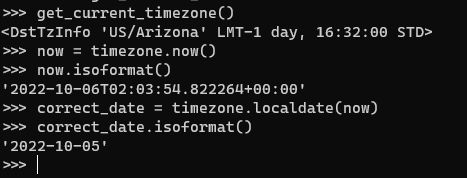
The interesting part come when you drill down into the timezone class; especially the now() method. The 2nd bullet says that now() will always return times in UTC REGARDLESS of the value of TIME_ZONE. So you get values that are 1 day ahead or behind depending on your time zone. Mine, was 1 day ahead:


I was expecting that the now() method would return a `2022-10-05` date (you can ignore the time component). Apparently, the now() method must be converted to the correct local date via the localdate() method. 


There's also a localtime() method if you need to get the correct local time for the time zone.


Tuesday, June 14, 2022

Enforce row count limits on ManyToManyField rows in Django models

I had a requirement where ModelA needs to limit how many ModelBs it can have. They are linked via a ManyToManyField using a through model.

It looks like this:

 class ModelA(models.Model):  
   name = models.Charfield(max_length=255)  
   b_limit = models.PositiveSmallIntegerField(help_text="Max number of Bs we can have")  
   model_b_set = models.ManyToManyFields('ModelB', through="ABJoinTable")  

 class ModelB(models.Model):  
   some_field = models.Charfield(max_length=255)    
   model_a_set = models.ManyToManyFields('ModelA', through="ABJoinTable")  

 class ABJoinTable(models.Model):   
   model_a = models.ForeignKey("ModelA", on_delete=models.CASCADE)  
   model_b = models.ForeignKey("ModelB", on_delete=models.CASCADE)  
   is_suspended = models.BooleanField(default=False)  

The through model just contains extra information is NOT the key to enforcing the rule. Remember, we want to limit how many ModelB rows ModelA can have. How many ModelB's ModelA can have it controlled by the "b_limit" field. 

The solution is to use the m2m_changed signal

from django.db.models.signals import m2m_changed  
from django.core.exceptions import ValidationError

def enforce_modelA_B_limit(sender, **kwargs):  
   modelA = kwargs['instance']  
   if modelA.model_b_set.count() >= modelA.b_limit:  
    raise ValidationError("ModelA has too many ModelBs")  

m2m_changed.connect(enforce_modelA_B_limit, sender=ModelA.model_b_set.through)  

You can place this wherever a signal function is valid. I just placed mine in the same place where the models are declared.

Why a signal?

If your gut feeling was to override the `save()` or `clean()` methods then those won't work. You cannot check the count for the ManyToManyField until you have save the primary model - ModelA. You'll get an exception saying something like: `ModelA needs to have a value for field "id" before this many-to-many relationship can be used.`.

Testing Tip

In writing a test case for this, you can use the `self.assertRaises()` context to catch the error. It's bad practice if you do a `try-catch` block to see if the rule works. The test case would look like this:

 def test_modelA_B_limit_rule(self):  
   # we assume that a setUpTestData() method exist  
   # we also assume that ModelA is limited to 1 ModelB so adding a second ModelB should throw an
   # exception
   sample_b = ModelB.objects.create(some_field="test")  
   modelA_instance = ModelA.objects.get(pk=1)  
   with self.assertRaises(ValidationError):  
     modelA_instance.model_b_set.add(sample_b) # should throw  

There's nothing to change if you have Django Rest Framework project. Your API will throw a 400 error if they violate the limit.

Refs: https://stackoverflow.com/questions/20203806/limit-maximum-choices-of-manytomanyfield

Thursday, June 9, 2022

Fixing a Django drf-yasg "serializer_class required" AssertionError

Sometimes you have an API view (ie. GenericAPIView) class without a serializer. This causes the drf-yasg generator to throw an AssertionError exception saying class should either include a 'serializer_class' attribute, or override the 'get_serializer_class()' method.

You can fix this by adding the following to the view class:

 def get_serializer(self, *args, **kwargs):  
     pass  
 def get_serializer_class(self):  
     pass  

This should pass the drf-yasg serializer check.


Reference

Monday, December 6, 2021

When Django 4.00rc-1, pipenv, djstripe and docker decide to pull the rug from under you

Sometimes you just need to rebuild your docker containers and that's where the problem started. When my containers came back, it wouldn't start because of a TypeError being thrown. 

  File "/usr/local/lib/python3.8/site-packages/djstripe/models/__init__.py", line 25, in <module>  
   from .core import (  
  File "/usr/local/lib/python3.8/site-packages/djstripe/models/core.py", line 30, in <module>  
   from ..signals import WEBHOOK_SIGNALS  
  File "/usr/local/lib/python3.8/site-packages/djstripe/signals.py", line 8, in <module>  
   webhook_processing_error = Signal(providing_args=["data", "exception"])  
 TypeError: __init__() got an unexpected keyword argument 'providing_args'  

Hmmm...

So I reviewed what was running on my docker containers. I had 4 containers: django with pipenv, celery, rabbitmq, and postgres. I ruled out postgres and rabbitmq out of the gate since the error is clearly a Python error. 

Focusing on the django container, I eventually found the error - took me the whole afternoon. At first I thought it was a docker bug but it wasn't. It was because of how pipenv was getting and installing the packages. Let me explain.

Our pipenv file that had django was set to install the latest version so it was written as django = "*". When I rebuilt the container and the dockerfile executed it downloaded the latest version of django which was 4.00rc-1.

The fix was to set the version: django = "~=3.2".

The moral of the story is don't blindly set your pipenv file to "*" and instead be explicit with the versions. Luckily pipenv does support semantic versioning meaning it will install minor versions of django 3.2 like 3.2.2 but not Django 4.0.


Thursday, September 3, 2020

Django-celery Error in Calling apply_async() - takes 1 positional arguement but xx were given

This error confused me initially and the Celery documentation wasn't directly helpful. 

 Traceback (most recent call last):  
  File "<stdin>", line 1, in <module>  
  File "/Users/jaypax/.local/share/virtualenvs/server-9an_1rEM/lib/python3.6/site-packages/celery/app/task.py", line 518, in apply_async  
   check_arguments(*(args or ()), **(kwargs or {}))  
 TypeError: run_scraper_one() takes 1 positional argument but 40 were given  

I called my task as run_scraper_one.apply_sync(args=('keywords here'), countdown=5). 

The run_scraper_one() method is decorated with @shared_app. So this should work. Should. But apparently after digging around: here and here, I figured out that it wants a list or tuple. 

So, the correct way to invoke the task is: 
run_scraper_one.apply_async(("keyword here",), countdown=5)

Fixed.

Monday, March 26, 2018

Why use the middleware approach for Django analytics?

Because of either proxy servers, ad blockers (like ABP, uBlock, etc.), or browser settings that stop JS scripts. Depending on the level of users and how much value they place on their privacy, they can outright BLOCK all forms of analytics. This ends up with our analytics data being unreliable or at least viewed with less confidence.

But why the middleware?

Django middleware is a good place because it's called for all request and response cycle.

The upside to this is:

  1. It's easy to customise. Django middleware is just a plain Python class with some methods. 
  2. The Django middleware is well-documented. 
  3. Allows us to setup whatever rules like exclude errors and only track HTTP 200 responses.
  4. We can setup tracking to be asynchronous. This way, our pages are not at the mercy of an external resource.
Writer's note: If your analytics needs are simple, you can install django-google-analytics and follow Usage #2 - Middleware + Celery.

There are a couple of downsides to this though:
  1. We could be impacting performance in a big way if the analytics middleware is doing too many things or worst, is misconfigured. 
  2. Not as bad as #1 but if we went down the asynchronous path, we will end up with a Celery server with some message broker like RabbitMQ on the tech stack. Another thing we'll have to manage. 
TL:DR For analytics with Django, HTML tag slows down pages and could be blocked; better to use a middleware approach.

Friday, February 23, 2018

Using Django forms to validate POST data in Rest Framework

Django Rest Framework already has a couple of ways to validate data. I believe the "preferred" way is to validate data from serializers. For example:


from rest_framework import serializers

class SomeSerializer(serializers.ModelSerializer):

    def validate(self, data):
        errors = {}
        year_built = data.get('year_built')
        year_rennovated = data.get('year_rennovated')
        
        if year_rennovated < year_built:
            errors['error'] = "You can't renovate something that doesn't exist!"
            raise serializers.ValidationError(errors)
            
        return data

But you can use Django forms, especially if you have existing ones that have the same "shape" of your post data.

Here's an example form:

from django import forms

class BuildingForm(forms.Form):

    year_built = forms.IntegerField(required=True)
    year_rennovated = forms.IntegerField(required=True)
                            
    def clean(self):
        cleaned = super(BuildingForm, self).clean()
        year_built =  cleaned.get('year_built')
        year_rennovated =  cleaned.get('year_rennovated')

        if year_rennovated < year_built:
            raise forms.ValidationError(u'Oops!')


And then in our API View:

from rest_framework.views import APIView
from rest_framework.response import Response
from rest_framework import status

class BuildingView(APIView):
    def get(self, request):
        model_form = forms.BuildingForm(request.data)
        if model_form.is_valid():
            data = serializers.someSerializer(obj).data
            return Response(data, status=status.HTTP_200_OK)
        else:
            return Response({'errors': model_form.errors}, status=status.HTTP_400_BAD_REQUEST)

Thursday, January 11, 2018

Django lazily evals URL patterns so I thought the "include" function was broken

Little known things sometimes kick your ass and you'll need to call a friend.

Until today, I didn't realise that Django lazily evaluates it's URLs. I discovered this when the code me and my team were working on had a cascading URL include. So we had something like:

# main urls.py
urlpattern = [ 
   url(r'^path/', include('app1.urls'),
]

# 2nd url - app1's url.py
urlpattern = [
   url(r'^app1/', include('app1.subapp.urls'),
]

# 3rd url - subapp for app1 urls.py
urlpattern = [
   url(r'^subapp/$, actual_view.as_view()),
]

Problem started when I assumed that the full URL path will show in the debug page on the browser. I was looking for /path/app1/subapp/. I only saw the /path listing.

This is where I thought that Django was not registering the rest. It never dawned on me that by just doing "localhost:8000/path/" will allow me to see the rest of the URL pathing. Django just shows the same or next urls not the urls 2 levels in.

Thank you Eric (@riclags) for pointing out that fact. 

I'm a dumbass sometimes.

Saturday, December 2, 2017

Dealing with global web assets on Django

Dealing with global web assets on Django, my thoughts.

Working with Django, often your default mode of thought is apps. App are like these small self-contain programs that have their own urls, views, templates and the web assets that come with templates. Web assets, I mean those css (or Sass or Less files), images and maybe some JavaScript.

But when you start thinking long term, as far as templates go, apps will prove unmanageable. You'll start thinking of breaking then into smaller reusable units while leveraging template inheritance. Which leads us to the dilemma, how do we handle the global web assets?

My first idea was just put it on the /static folder. It works but not a good idea because a standard django .gitignore will exclude the /static folder.  Another thing, /static folder is where the django-admin collectstatic command puts all files it gets from the your dependency modules. It's not uncommon to have hundreds of MB inside this folder - hence, you don't commit them into repos.

So, I had to figure out a way that allowed to me get around the .gitignore rule (which I won't edit - they are standard for a reason) with the assets. What I ended up with is

1. Putting the global, shared web assets in an /assets folder
2. Inside the /assets folder are subfolders for css, js, img, font
3. Change my django configuration to handle it.


STATIC_ROOT = str(ROOT_DIR('static'))

STATICFILES_DIRS = [
    ('projectA1', str(ROOT_DIR('assets'))),
]

STATICFILES_FINDERS = [
    'django.contrib.staticfiles.finders.FileSystemFinder',
    'django.contrib.staticfiles.finders.AppDirectoriesFinder',
]


The ROOT_DIR function is just a helper function that prints out the path to static relative to the root directory.

So anyway, an example usage then is like .. href="{% static "projectA1/css/style.css" %}" which is pretty nice. Details are here.

Friday, May 5, 2017

Ghetto Python development with VS Code

Not everyone can afford Pycharm or Sublime or you just don't like the new Pycharm terms/license then this could be a alternative setup with Visual Studio Code.
  1. Install Visual Studio Code. It's has all the "f"s: fast, free, flexible, fowerful.
    Don't forget to install Python also.

    Tip: Install Python 3 unless you're maintaining legacy Python code then install Python 2.
  2. Pick our plugins for Python. You can install plugins or extensions from the within VS Code; Just click on the "Extensions" button on the side menu or you can download them from the "marketplace" and install them manually. Go here for details.

    Here's our list of extensions.
    1. donjayamanne.python - our primary plugin so we can work with Python. It's got almost all the things we'd expect to make for a good Python IDE; Intellisense, Code formatting, refactoring, debugging, and linting.

      EDIT: I think this has been rolled into the official Python plugin by Microsoft.

      A word on linting though, The plugin doesn't come with it. You'll have to install your linting module like say Pylint or Flake 8 separately via pip. 

    2. Indent-raindow - Trust me, you'll need this. It makes seeing the code indents easier. 

    3. Jinja - This is an optional plugin. You'll probably only need this if you're working with a lot of Jinja templates.

      Don't forget to explore the marketplace for other customisations like themes.
  3. Start coding. Don't forget to make a virtual environment because VSCode does support them on a per project bases via a settings JSON file. Same with debugging.
  4. Push to a repo. VSCode already has a git client built-in so push your code to popular repos like Github, Gitlab or Bitbucket.
Code away!

Tuesday, January 24, 2017

Doing query param request in Django

Typically, I want my API endpoint url to be flat like this:

mydomain.com/shit_api/v1/person/123

That url is pretty straight forward, it's trying to get a person with an ID of 123 from shit_api. But that's not always clear cut.

I've been working on a particular API that needed a pair of optional filters that we're a pain to work out in a regular expression. And this is where I found about Django's QueryDict object. With it I can write out API urls with params:

mydomain.com/shit_api/v1/something/?filter1=value1&filter2=value2

And on the urls and views, I can handle it as such:

#urls.py
urlpatterns = [
   url(r'^parts/$', SomethingView.as_view()), name='Something'),
]
...

#views.py
class SomethingView(View):
   def get(self, request, *args, *kwargs):
      fiter1_value = request.GET.get('filter1', 'default')
      fiter2_value = request.GET.get('filter2', 'default')

      #do more here

      return Response('some response')

The thing here is that request.GET.get() method having a default value. This make it that having it on the URL it isn't a problem. So call like:

mydomain.com/shit_api/v1/something/

Will still work.

Bonus since I don't have to deal with a convoluted regular expression. Yehey!

Friday, January 13, 2017

Tricks with Django URLs and knowing you suck doing RE

RE or regular expressions and I don't really see eye to eye. But as a programmer, I have to work with them. So it's awkward like your ex works in the same office as you. But lucky for us, we just stick to a couple of tricks to make it a bit palatable.

Numbers in URL

You'll need to use a \d+ in the pattern.

ex: (r’^status/(\d+)$’, ‘myapp.backbone_view’)

This would work on /api/status/1

Dealing with spaces

I found two ways to do this but then found out that they are the same: [\w|\W]+ AND .+

Yes that's a dot.

ex: (r’^status/([\w|\W]+)$’, ‘myapp.backbone_view’) OR
(r’^status/(.+)$’, ‘myapp.backbone_view’)

This would work on /api/status/dead on arrival

The browser will just replace the spaces with %20 and it should work.