Showing posts with label Ideos X6. Show all posts

Thursday, March 15, 2012

Got tired waiting for ICS so back to MIUI

ICS on my phone was sweet - battery life was excellent, games (3d and what not) were running smoothly but and this is a BIG but..No camera. I know that edowar is working on it and its a pretty hard problem to crack. It's a hardware driver problem and Foxconn isn't really going to fork over that one any time soon.

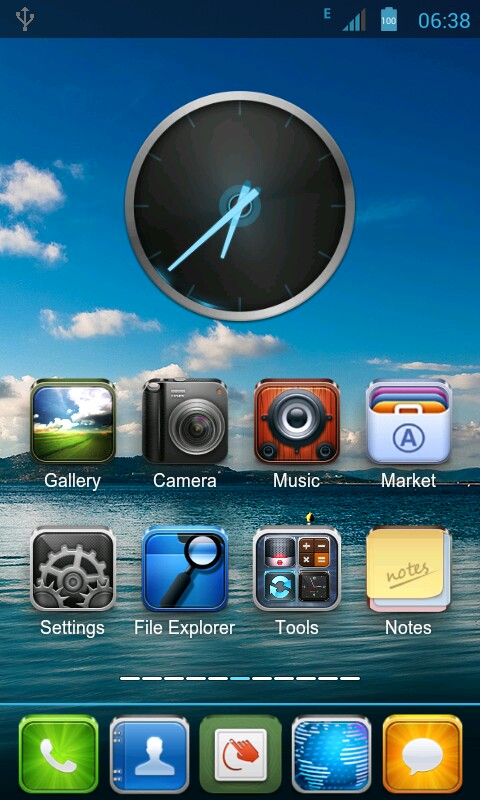
My Home screen
So we go back to MIUI. Imagine my surprise that TJ's MIUI wasn't the only one out there for my CM Magnum. People made forks and ran with it. I mean RAN. I found 4 more other ROMs for my phone and all based on TJ's stuff. TJ is a god!

As for the choosing which on to flash into my phone - I wasn't really that scientific about it. I just basically went for the "eye-candy" factor. I decided on CacingKalung's MIUI 2.2.3 ROM.

It's about 117MB (make that about 120ish if you download the extras which I did.) and it installs flawlessly.

I'm reinstalling my stuff and let's see how this works out while waiting for a stable,working ICS for my phone.

So far, its pretty sweet.


Saturday, February 11, 2012

Adb can't detect my Android Phone. Damn.

So you open a command line and type in adb devices and, guess what, it can't detect your Android phone. This could be because of a variety of reasons like you installed a custom ROM. In any case, adb can't detect your device. Fortunately, the fix is just to install a driver. The bad part is the phone manufacturers sometimes don't post their USB drivers on the net.

How do we fix this?

1. Identify who really makes your phone. Like mine, which is sold as the Cherry Mobile Magnum HD but its actually a Foxconn phone. Do a google search or a lsusb command if your running a Linux box. You should be able then to get the ATTR{idVendor} value.

2. With that, go to this webpage. That should explain how to get your device recognized and help you figure out who made your phone.

3. You should be able to figure out which OEM driver to get.

Install and then you might have to do a reboot. When you get back, your Android phone now should be recognized by running adb devices again. You should be looking at something like below.
adb devices
This is related to my older post: Getting Ubuntu to play nice with your Android device.


Monday, September 19, 2011

Rooting your CM Magnum again

Ok, so you had to update your CM Magnum to Gingerbread via the official Cherry Mobile ROM. This will basically "unroot" your already rooted phone and bring it to 2.3.4 or something. I know its been months since then but I have been doing stuff. I do have a life.

But that still brings us back to the issue at hand, how do I root my Magnum, Ideos X6, etc. again? OK, I can answer that but remember,

I. Will. Laugh. At. You(twice as hard). If. You. Blame. Me. If. You. Brick. Your. Phone.

 So, as far as I know, these don't work:
How do I know? Duh, I tried them of course.
The only one that I have verified that works is tj_styles CWM recovery procedure. Najmods has posted the procedure here.

But if you are too lazy to open a new tab (sheesh...) then here is the procedure:

AWRRR! Walk the Plank, Android!
First step: Replace original recovery with ClockWorkmod Recovery
1. Download ClockWorkMod Recovery
2. Put the device in download mode (Power+Vol Up) and connect to PC,
and the PC will recognize the device as Removable Disc/Storage open it and you will find FIH > Image folder and select recovery.img, copy it anywhere to your PC as backup just in case if anything go wrong
3. Replace recovery.img in 'image' folder with recovery.img inside the Clockworkmod Recovery v4.0.0.9 you download and extracted earlier
4. Disconnect device from PC, open up the battery and reboot.

Second step (DO FIRST STEP FIRST): Rooting the phone
1. Download Su 2.3.6.3 signed.zip and put it in sdcard (but don't put it in any folder)
2. Put the device in recovery mode (Power+Vol Up & Vol Down)
3. Select "install zip from sdcard" and select "Choose zip from sdcard" and search for 'Su 2.3.6.3 signed.zip' and click install.
4. Select "back" and click "reboot system now"

Now to install busybox and do something really stupid/cool like put a perl/ruby/whatever interpreter in my phone. Why install a perl/ruby/whatever interpreter in my phone, you ask? Because I can.

What is your excuse?
Wednesday, August 17, 2011

And then one day....CM7 came

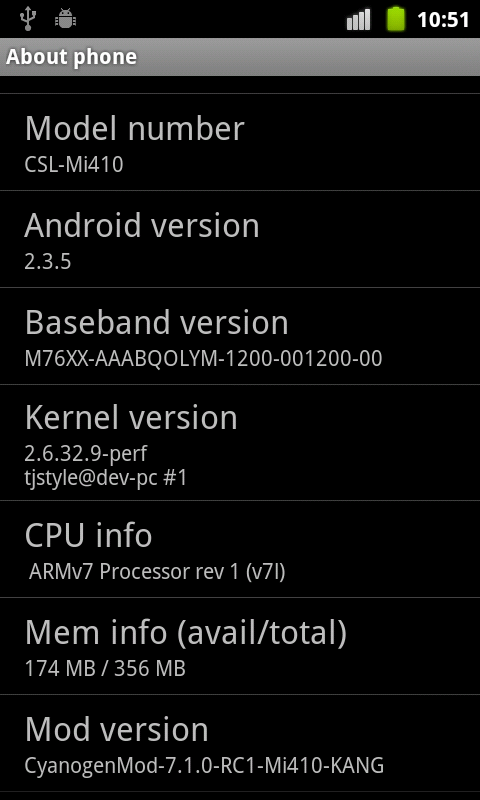
Yes you read that right! CyanogenMod 7.1.0 can now be installed on your Cherry Mobile MagnumHD and I have pictures to prove it!

Well...its not exactly my phone as of yet. I pulled that one from the XDA-Developers site. But it shows that you can now install Cyanogen on your Magnum. The CSL-Mi410 is basically the same phone as the CM-MagnumHD.

For the full set of images proving this fact go here.

As for me, I'm waiting for a bit. The images were put up on August 13, 4 days before this post. I'm taking a see and wait approach.

I'll probably try it out this weekend or something.

*BIG GRIN*

Tuesday, March 29, 2011

Fixing that buggy stock ROM on your CM MagnumHD

My phone's
home pane
For those who are lucky enough to get Cherry Mobile's MagnumHD, we all can agree that the stock ROM f***** sucks. I really mean it sucks - the random restarts, the FCs, context buttons stop responding and the the most annoying is the screen times out (i.e. blacks out) when you make a phone call. So, being a geek, I will have none of this and I started scheming (along with Aryan Limjap which BTW, provides us the lovely images attached to this post) to get a fix into my CM Magnum. Warranty be damn!

System Pane
And what do you know, the Indians Indonesians came up with a better ROM. As you can see I'm now running a Wellcom-A99 ROM on my CM MagnumHD. I can tell you it runs better, cooler and longer. Also I would like to point out the Android version 2.2.2. I will still flash this thing to 2.3 when it comes out. But trust me on this, MY PHONE IS RUNNING BETTER on this ROM.

You might wonder how is this possible, then you apparently didn't inherit enough "bright" genes from your parents. But to get my point moving, CM MagnumHD is OEM phone from Foxconn and is rebranded in a lot of other countries.
  • Philippines - CM MagnumHD
  • China - Huawei Ideos X6
  • US - Viewsonic ViewPad 4
  • India Indonesia - Wellcom A99
  • India - OliveSmart V-S300
With the Apps
And that is why children, I can stick an Wellcom A99 ROM on my CM MagnumHD. But still want to beat this into your head, if you are doing this you are voiding your phone's warranty. As for me, I already voided mine when I rooted my phone. Refer to the screenshot with the apps.

So if you understand what I am telling you and you still want to flash in the Welcomm ROM then click here. Just scroll down and look for the link. The download is about 200MB. 

And btw, did I mention to you all that there's still a slight chance that this will put your phone into a boot-loop or (worse) brick your phone?

Edit: Mecha50 corrected me that the A99 ROM is Indonesian. My bad.

Saturday, February 26, 2011

Void your warranty and root your CM Magnum HD at the same time

This is basically a repost of Takahiro Sonogi's post over at PHAC. He posted a way to root your Cherry Mobile Magnum HD which is also known as Viewsonic ViewPad 4 and Huawei Ideos X6 (also known as Huawei U9000).

There a lot of reasons to root your Magnum HD, one of them is to void your warranty. The other good reasons are:
  1. To install custom ROMs. The problem is just that the device is so brand spanking new that there are no custom roms...yet.
  2. To turn it into a target dev device. Which is my reason. It just sucks writing code that needs access to some /system binaries and get cock blocked because its not rooted.
  3. Its Friday night and got nothing to do. Ok I made this one up.
In any case, I'm telling you again ROOTING YOUR CM MAGNUM VOIDS THE WARRANTY. I want to be clear about that.

Now if you are one of those Windows GUI babies and doesn't know his way around CMD or DOS you are way over your head. Stop what you are doing because YOU MIGHT BRICK YOUR PHONE AND I WILL LAUGH AT YOU. You heard me, if you screw this one up and blame me, I. WILL. LAUGH. AT. YOU.

If you haven't changed the webpage then download and install the Android SDK.

Here are steps to root your CM Magnum HD

adb devices
  1. Take your Magnum and plug it in into your PC and make sure it is recognized by ADB. Run ADB from the command line and type adb devices. If there are no devices, then you need to install something like a USB device driver. There should be on with your phone. Whatever the case you are looking for something like the screen shot on the right;
  2. Then download something called rageagainstthecage. Unpack it and put it somewhere where you can get to it from the command line. 
  3. Copy the rageagainstthecage-arm5.bin to /data/local/tmp folder on the device:
    adb push rageagainstthecage-arm5.bin /data/local/tmp
    adb shell
  4. Now do a CHMOD and run it:
    chmod 755 /data/local/tmp/rageagainstthecage-arm5.bin
    /data/local/tmp/rageagainstthecage-arm5.bin
  5. Get a copy of Superuser (SU) and busybox. Now unpack it. Do the following:
    mount -o remount,rw /dev/block/mtdblock3 /system

    adb push su /system/xbin
    adb push busybox /system/xbin
    adb push Superuser.apk /system/app
    adb shell

    chown 0.0 /system/xbin/su
    chmod 6755 /system/xbin/su
    chmod 755 /system/xbin/busybox
    chmod 644 /system/app/Superuser.apk

    ln -s /system/xbin/su /system/bin/su
  6. Reboot and redo step 1. Once you get your PC to recognize your phone do the last step.
  7. Got root?
  8. And for the moment of truth, if you haven't bricked your phone yet, time to see if we really have root access. Refer to the screen shot. You are looking for the "#" symbol. You might have to accept a prompt from your phone.
If you got this far, congratulations. You just voided your phone's warranty and rooted your Magnum HD at the same time.

Woot!