Showing posts with label Drupal. Show all posts

Saturday, October 20, 2012

Drupal Extended Filtered HTML tags

In Drupal (no matter the version), content editing uses text filters to "sanitize" the output. The text format contains filters that change the user input, for example stripping out malicious HTML or making URLs clickable. One of these filters is "Filtered HTML"; Due to security reasons, enabling Full HTML is only an option for trusted users.

But the default set of allowed HTML tags for "Filtered HTML" is quite narrow and limited. So, the first thing to do is to extend the list of allowed tags to:

<a> <p> <span> <div> <h1> <h2> <h3> <h4> <h5> <h6> <img> <map> <area> <hr> <br> <br /> <ul> <ol> <li> <dl> <dt> <dd> <table> <tr> <td> <em> <b> <u> <i> <strong> <font> <del> <ins> <<sub> <sup> <quote> <blockquote> <pre> <address> <code> <cite> <embed> <object> <strike> <caption>  

But remember, "Filtered HTML" not only strips disallowed tags, but also strips inline style definitions.

Sunday, September 2, 2012

Quick & Dirty Tabs on Drupal nodes

I just want a dead simple tab on a Drupal node but sometimes Drupal (with the internet) will just bend you over and spank you.

If you are reading this, I bet you found Quicktabs and read katbailey's "Go forth and tabbify" post but you came to the conclusion that its either:
  1. To complicated; You suspect that the hook_page_alter() function is gonna bite you in the ass down the line 
  2. Its not what you need 
I'll also bet you tried a few other approaches like leveraging the jQueryUI tabs like what Matt did and still found that it wasn't what you want. So now what? Well, you can do what I did - the quick and dirty tabs. 

My quick and dirty tabs is just javascript, html markup and a Omega subtheme. And it just involves 4 steps.

1. The HTML markup. You will use this inside your node.tpl.php or equivalent node template override. Notice the page-control and page-sections parts of the markup.
<div class="com-profile">  
      <div class="page-control">  
           <ul class="myQDtabs">  
                <li class="active"><a href="#">Basic Information</a></li>  
                <li><a href="#">Photos</a></li>  
                <li><a href="#">Forum</a></li>  
                <li><a href="#">Contact Persons</a></li>  
           </ul>  
      </div>  
      <div class="page-sections" style="display:none" >  
           <div class="section">  
                <div class="info">  
                     ...  
                </div>  
           </div>  
           <div class="section" style="display:none" >  
                <div class="gallery">  
                     ...  
                </div>  
           </div>  
           <div class="section" style="display:none" >  
                <div class="forum">  
                     ...  
                </div>  
           </div>  
           <div class="section" style="display:none" >  
                <div class="contactperson">  
                     ....  
                </div>  
           </div>  
      </div>  
 </div>  

2. The Stylesheet. I settled on a pill type of tabs. Just add these styles on the main subtheme stylesheet.
3. The Javascript. This is a tricky bit. If you have read Matt's post about Drupal and jQueryUI tabs, you'll know that Drupal allows other javascript frameworks so Drupal uses jQuery's .noConflict() function. This forces you to write your jQuery withouth that the '$' alias. Oh, create this script somewhere inside your subtheme.
jQuery(document).ready(function(){
    QDtabs('.myQDtabs','.page-sections','click');
});

//function-type tab switching
QDtabs = function($tabs,$tabcontent,method){
  jQuery($tabcontent + ' .section').eq(0).fadeIn();
  jQuery($tabs + ' li').eq(0).addClass('active');
 
  jQuery($tabs + ' li:not(.active)').die().live(method,function(e){
  e.stopPropagation();
  
  var $self = jQuery(this);
  var index = $self.index();  
  $self.addClass('active').siblings('.active').removeClass();  
  jQuery($tabcontent + ' .section').hide().eq(index).stop(false,true).fadeIn();
  
  return false;
 })
}

4. And the last step is making my Omega subtheme load the custom script. Omega has a particular way of adding custom javascripts.

libraries[my_script][name] = QD custom script
libraries[my_script][description] = Quick and dirty tabs
libraries[my_script][js][0][file] = my_scripts.js
libraries[my_script][js][0][options][weight] = 15

The last thing to do is a bit of housekeeping - Clear your Drupal cache and turning on my_script inside my theme's admin interface.


Sunday, June 10, 2012

Drupal taxonomy for Philippine Regions & Provinces

Drupal Filipino developers might find this useful, A CSV formatted taxonomy for Philippine regions and provinces. It's hierarchical in format and you can import it into your Drupal site using taxonomy manager.

Here is a small sample of the taxonomy:

ARMM (Autonomous Region in Muslim Mindanao)
Basilan
Lanao del Sur
Maguindanao
Tawi-tawi

CAR (Cordillera Administrative Region)
Abra
Apayao
Benguet
Ifugao
Kalinga
Mountain Province

Sorry, cities are not included in this taxonomy.

Download Philippine regions and provinces CSV.

The data is from www.pinas.ph website.

Sunday, December 11, 2011

Enable that Drupal Module from inside Netbeans

Drupal development - module or theme - in Netbeans work but you'll have to deal with a few quirks, gotchas and trade-offs. One of my pet peeves is where that I have to open a command outside of Netbeans to use Drush. I have gotten use to my Java flow where I can call or use Maven or Ant inside Netbeans. I don't have to suffer anymore! Because I have found a plugin that makes Drupal development in Netbeans cool, pleasurable again. Introducing NDDT or Netbeans Drupal Development Tool.

NDDT is developed by Jamie Holly who just happens to be the owner of Holly Information Technologies which owns the code to NDDT. Amazingly he is currently allowing Drupalist to freely download the plugin as a NBM package. A NBM package is the file format for Netbean plugin. 

I haven't tried out all the features as of yet but I've noticed that I've been using three features of the NDDT everytime for the past week since I installed NDDT.
  1. Drush console - No more opening the admin module page for me. I just run pm-enable from Netbeans.
  2. The snippet and templating feature - You just gotta love any feature that cuts down on the typing
  3. Drupal API search feature - I don't have to keep open a tab for the api.drupal.org site. 
Any Drupalista who uses Netbeans SHOULD give NDDT a spin. It's FREE and it WICKED!

Monday, November 7, 2011

Views and jCarousel fun

Node.tpl.php
So, to make a long story short, I got a client who wanted to display his Drupal site's content nodes just like the image above. We are working with Drupal 6.

He wanted:
  1. A callout box that contains location and a link
  2. An image carousel 
  3. A social networking toolbox 
Interesting. 

So we start off with a custom content type. My setup is composed of CCK, Location, Image, ImageCache. 

Content Construction Kit (CCK) needs no explaination. You can't make custom content type without it. The Location module is used with CCK to capture Location data. The Image module so we can attached, well, images to the node. The ImageCache complements this; allowing us to process the attached images to whatever size we need it.

We are are off to writing code in the our theme's template.php. We are going to preprocess our node data. Here is mine. Your CCK field names might not be same as mine but you can look at the CCK field names up with a dpm($vars) call. Remember that you can't make a dpm call without the devel module.

function [YOUR_THEME]_preprocess_node(&$vars, $hook) {      
    // construct callout box for organizer and venue
    $organizer_url = $vars['field_organizer_link']['0']['view'];  
    $venue_name = $vars['field_record_venue']['0']['name'];  
    $venue_street = $vars['field_record_venue']['0']['street'];  
    $venue_city = $vars['field_record_venue']['0']['city'];  

    $field_venue = '<div class="venue"><span class="venue-title">' . $venue_name . '</span><br/> <span class="venue-location">' . $venue_street . ', ' . $venue_city . '</span></div>';  
    $field_organizer = '<span class="organizer"><p> For more Information,<br/> visit the organizer\'s site</p>' . $organizer_url . '</span>';  
    $vars['callout'] = '<div class="callout">' . $field_venue . $field_organizer . '</div>';  

    // construct embedded view for image carousel  
    $embedded_view = 'embedded_related_img';  
    $embedded_args = $vars[nid];  
    $emdedded_view_display = 'default';  
    $vars['embedded_carousel'] = views_embed_view($embedded_view, $emdedded_view_display, $embedded_args);  
  }  
We then can insert the newly constructed callout box via the $callout variable. See line #12.

The next step here is the image carousel. I did this using Views and jCarousel. When you read up on how to use jCarousel it should be apparent that you can use a Views argument to make an image carousel of the current node using its id and get all the attached images. I then named the view "embedded_related_img". Set the view style to jCarousel. The options shouldn't be a problem. It will not preview correctly since Views will not load the javascript for the carousel. I then attached this on the node via the $embedded_carousel variable. The magic is the views_embed_view() function. See lines #15 - 18.

And as for the social networking bar that's done with the addThis module. This should be a no-brainer.

For reference, here is the node.tpl.php file.

<div id="record-<?php print $node->nid; ?>" class="node record clear-block">   
   <?php if ($page == 0): ?>  
     <h2 class="title"><a href="<?php print $node_url ?>" title="<?php print $title ?>"><?php print $title ?></a></h2>  
   <?php else: ?>  
     <h2 class="title"><?php print $title ?></h2>  
   <?php endif; ?>  
   <div class="content clear-block">  
     <?php print $picture ?>  
     <?php if(!$teaser): ?>  
       <?php print $callout; ?>  
     <?php endif; ?>  
     <?php print $content ?>  
   </div>  
   <?php if(!$teaser): ?>  
     <div class="embeded_view clear-block">  
       <?php print $embedded_carousel; ?>  
     </div>    
   <?php endif; ?>  
   <?php  
   if ($links) {  
     print '<div class="node-links">'. $links .'</div>';  
   }  
   ?>  
 </div>

Sunday, August 28, 2011

Drupal Themes and Favicons

A favicon also known as a shortcut icon, Web site icon, URL icon, or bookmark icon, is a file containing one or more small icons, most commonly 16×16 pixels, associated with a particular Web site or Web page. Its that small image that you see on you Firefox tab along with the name of the webpage.

Clients like favicons but making one can be easy or hard, it depends on your approach. If you're old school, then you can use MS-Paint or GIMP or if you're like me,I cheat. I use a web favicon generator. I use favicon.ico generator. Most amazing thing about favicon.cc is that its free. FREE!

You have a favicon, you'll need to copy it to your theme folder. Make sure that is on the same folder as your .info file. Don't put in a sub folder like say img or css.

You'll need to edit your theme .info file. Here is a excerpt of mine theme .info file.

; ------- Declare default theme information

name        = LGR 960.gs
description = Omega Sub-Theme for LGR
screenshot = screenshot.png
core       = 6.x
base theme = omega

; ------- Declare default theme features
features[] = logo
features[] = name
features[] = slogan
features[] = mission
features[] = node_user_picture
features[] = comment_user_picture
features[] = search
features[] = favicon
features[] = primary_links
features[] = secondary_links

The thing here is the theme features section where it says feature[] = favicon. This basically says to Drupal to look for your favicon on the same level folder where the .info is placed and use it. Normally, this is automatic to Drupal themes especially if you subtheme one of its many primary themes like Zen or Omega.


Friday, August 19, 2011

Rediscovering blog syndication on Facebook

This blog of mine always had a feed but I didn't use it much other than that odd programming experiment like trying out that new library for parsing XML data. That was until someone at groups.drupal.org mention that you can add your blog post into your Facebook wall automatically. You betcha the light bulb went TING!

Someone needs to update that Help page!
So jumped to Facebook's help center to read up on using this feature. You should get the sense that you'll need to use the "Notes" application for this. But that when things started to go a little bit sideways.

There is no "Import a blog" link in mine. WTF! But no worries, I did figure out what the "Edit import settings" is all about. And the link is not on the right side of the page.

With that solved, now I can automatically publish my post into my Facebook wall once I save it. Gravy!


Friday, June 17, 2011

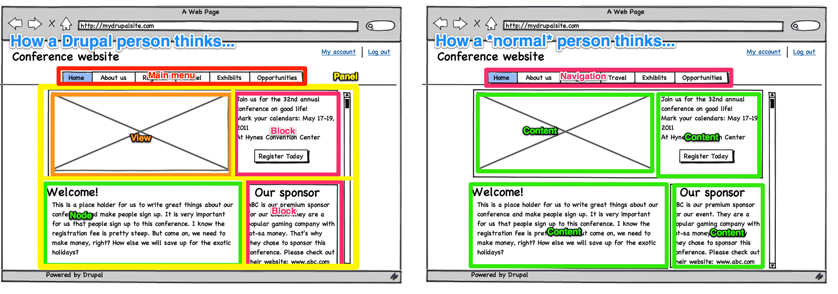
How I see things: A Drupal devel to a Drupal Designer

Its hard dealing with clients that are so...."technologically challenged". You would think that with a designer, things would go a bit easier - well not exactly. As a Drupal developer, I had done my fair share of hand-holding first time designers working on their first Drupal site - also true for clients.

From experience, first time clients and designers need to understand that we simply won't always see eye-to-eye on all things when it comes to Drupal.  All this reasons have been confirmed by a recent research done by the University of Minnesota on Drupal Usability.
  1. Drupal terminology confuses clients and designers alike. Words like "node", "block", "views" or "module" have different meanings to clients and designers compared to what I understand what they mean in the Drupal context.
  2. Clients and Designers see different things when looking at a Drupal webpage.
  3. How they see and what I see
  4. Drupal doesn't really make distinctions between frontend and backend - Yes, I am taking about clients familiar with Joomla.
  5. As a developer, I don't do design that well. As Forrest Lyman (of Pro Zend Framework Techniques) said:
    A great deal of this boils down to one of the most striking differences between programming and design:
    • The foundation of programming is binary logic; there is a right and wrong way to implement a given algorithm.
    • The foundation of design is how your brain interprets what it sees; since everyone interprets things differently, it is impossible to say whether something is right or wrong.
    True That.
Go with the flow, I guess. What else exactly am I gonna do other than educating them?

Tuesday, May 17, 2011

Rounded Corners in Drupal - the easy way

Doing rounded corners is pie in Drupal. There's really 3 "real" options.
  1. Do it with a module (http://drupal.org/project/rounded_corners)
  2. Do it with hardcore CSS + images
  3. Do it with jQuery
I don't know about you but options 1 and 2 take too much work (for me anyway). So, I went option 3 and let jQuery do all the work.

You start off by downloading the jQuery corner plugin. This is a sweet little plugin written by Dave Methvin and Mike Alsup. After downloading the corner plugin, copy it to into the /js folder of your target theme. Create the folder if it doesn't exist.

Refer to the screenshot to the right. If you are wondering, I am using Netbeans 7 and that is a partial screenshot of my workspace.

After that create a second js file. I named by icc960scripts.js. This is where I wrote the javascript to use the jquery corner plugin. Here is the content in mine:

$(document).ready( function(){

    // the top part of the block
    $('#sidebar-last .block h2, #header-regions .block h2, #main-content .odd h2').corner("top");

    // the bottom part of the block
    $('#sidebar-last .block .content, #header-regions .block .content, #main-content .node-content ').corner("bottom");

});

Top part of the block is an H2 element which is rounded only on the top part. And then bottom part is a
DIV element with a border. You might have to override (or modify) the node.tpl.php template if you are using a template with a different markup.
Screenshot from firebug of the HTML structure
Rounded Block
What left is just to add some CSS to make it look good. Here's how mine turned out. The header background color is #CBB859 and the border value of the div is 1px solid #ccc.

BTW, don't forget to declare the scripts in the .info file of your Drupal theme.

; ------- Declare default javascript includes
scripts[] = js/jquery.corner.js
scripts[] = js/icc960scripts.js

It should be easy to figure out that the same technique can be applied to other elements in the Drupal theme output. Experiment and see what works and what doesn't!

Wednesday, April 20, 2011

Dealing with duplicate taxonomy terms

I haven't encountered this views bug until last Monday. I was working a view where I needed to show unique taxonomy terms in a grid. I was setting up something along the lines of "browse by category" view and what I got was a grid filled with multiple/duplicate terms.

Knowing the error, I started googling for answers but that exercise just made me run around in circles. Until I got to himerus' blog (he's also the guy working on the omega theme, you should check it out) and a drupal.org node.

With the solutions I started trying them out. I settled for the "custom" module solution. The first time I tried it, it didn't work right off the bat. Take a look at the code:

<?php
// $Id$

/**
* Implementation of hook_views_pre_render
* This function is in place to filter out duplicate taxonomy terms
* From listings. It will cycle each result, and store a new array of
* unique terms, and when a duplicate is found, will unset that result
*
* @param $view
*/
function your_module_views_pre_render($view){
// first we make sure we are dealing with the correct view
if ($view->name == "your_view_name") {
  // create our array for comparisons
  $unique_tids = array();
  // let's cycle through each default result, and do some dirty stuff
  foreach($view->result AS $k => $result){
   if(in_array($result->node_node_data_YOUR_FIELD__term_data_tid, $unique_tids) || !$result->node_node_data_YOUR_FIELD__term_data_tid) {
    /* we already have seen this TID in the results, so blow that crap away
     * also will blow away any that are empty for some odd reason
     */
    unset($view->result[$k]);
   }
   else {
    // this is a term we haven't seen, so let's not blow it away, but add
    // it to our array of unique id's to present as the "true" result of this view
    $unique_tids[$k] = $result->node_node_data_YOUR_FIELD__term_data_tid;
   }
  }
  /* now, we have an accurate unique list of terms in $unique_tids
   * next, we cycle those to reorder the crap random ordering
   * since these tids were pulled from the nodes in the order they were
   * set to sort from the node type view
   */
  $alpha_arr = array();
  // cycle each of our unique tids, referencing the original key of the view->result array ($k)
  foreach($unique_tids AS $k => $tid) {
   // we need to grab the term now, not the tid to sort alpha
   $alpha_arr[$k] = strtolower($view->result[$k]->node_node_data_YOUR_FIELD__term_data_name);
  }
  // sort the array, maintaining the $k key so that we may again reference back to the original data
  asort($alpha_arr);
  // create new array of results to overwrite the current one
  $new_results = array();
  /* cycle one last time now that we have unique terms, sorted alphabetically
   *    the point of this is to now take our $k reference, and grab the original $view->result data
   *    that references this item
   */
  foreach($alpha_arr AS $v => $term_name) {
   $new_results[] = $view->result[$v];
  }
  // get rid of the original result set
  unset($view->result);
  // replace it with our new, accurate result set
  $view->result = $new_results;
}
}

Take a look at the "your_view_name", node_node_data_YOUR_FIELD__term_data_name and node_node_data_YOUR_FIELD__term_data_tid items. It should be easy to figure out the "your_view_name" thing. Just replace it with name of your views.

The  node_node_data_YOUR_FIELD__term_data_name and node_node_data_YOUR_FIELD__term_data_tid items is slightly different and made me to install a devel module to figure it out. Take a look at the $result array, I relized that I needed NOT to use the node_node_data_YOUR_FIELD__term_data_name or the node_node_data_YOUR_FIELD__term_data_tid but instead used a much shorter array key. So instead of "node_node_data_term_id__term_data_tid" use "term_id".

What's left is to turn on the module and flush the cache.

You should be golden!

Thursday, December 16, 2010

FFMPEG, Ubuntu and other drugs

First off, Video support for Drupal is a dandy piece of work. They got lots of modules for that. You got:
  1. FlashVideo
  2. Video_Upload
  3. Embed
  4. And of course, Video
Now combine Video with other modules like CCK, Views, etc. You get a Drupal website that can handle Video content very well.

Unfortunately, Video which I use doesn't convert/transcode video automatically without some support.  This is where FFMPEG comes in but FFMPEG comes with a few gotchas and quid pro quo's. The default FFMPEG but  doesn't have a lot of codecs, for example, it doesn't have mp3 support.

And to make thing a bit of a challege is that FFMPEG is not on your default Ubuntu Hardy repos. So, you can't directly do an apt-get install ffmpeg and be done with it. You have to jump a few hoops first.

The first hoop is you have to edit the source.list on the apt-get souce.list.d folder. Its located in /etc/apt/source.list.d. You'll have to use a text editor to edit it; vi for the hackers, nano for novices and sorry no emacs on my Ubuntu. Just uncomment the universe and multiverse repos and then issue an apt-get update after you are done editing the source.list file.

And then the second hoop is a bit more complicated. You'll have to read FakeOutdoorman's guide to installing FFMPEG for the details here. Basically, this is the part you get codecs for FFMPEG so you can transcode a lot more stuff like hi-def videos (H264), mp3 (libmp3lame), theora, etc.

After that and a little bit more tweaking and you'll get something like this:


My setup is using Flowplayer for Drupal. The whole idea is to use CCK with Video to handle the video content and then use FFMPEG to transcode the various video formats (eg. avi, mpeg, wmv, mov, mp4, etc.) to flv. Now combine that with flowplayer to play the transcoded videos and Views + taxonomy to sort and display the video content on the site.

Just remember, Video calls FFMPEG via the command-line. FFMPEG then processes the videos and then Video handles the resulting (now converted/transcoded) video.