Homer's got nothing to do with this - besides he's a nuclear technician not a web developer.
This where we add our database part of our addressbook web application. This part is actually pretty long so I am going to split it into two maybe three parts.
Let's get started...
We will be using a design pattern called Data Access Objects. We will inject this as a service, exposing it to the entire web application. We will also use
Hibernate for this. This will further simplify our DAO approach. If you don't know or forgot what is a design pattern or even what is a DAO,
educate yourself.
We already have all the pieces - we got the database, our webapp and our IDE - all we need is to use these pieces and work our DAO.
We begin by creating our
hibernate.cfg.xml file. This file will connect us to our database where we created earlier at the beginning of this
tutorial series. Where we put the file is defined by the file layout of our Tapestry5 web application. Now...
- Go to the Other Sources node of our project browser and locate the default package,
- Right-click select New and then Other.
- Look for the Hibernate folder and then select Hibernate Configuration Wizard.
- Just accept the defaults of the first two pages until you reach the third page of the wizard where you select the data source. Select New Database Connection and supply the details more or less like the screenshot.
You should be now look at a
hibernate.cfg.xml file. The next part is where we add some optional bits to our hibernate.cfg.xml file to help us debug our code later. Trust me, better to do it now than later.We could remove this bits when we deploy or we could simply leave it. Almost all of the debugging code outputs into the console anyway.
- Open the hibernate.cfg.xml file if its not open(duh!) and locate Optional Properties
- Open that up and we will add two new properties
- The first property is the hibernate.show_sql (should be the first item in the combo box) and set it to true.
- The second one is to set hibernate.format_sql to true. This basically just pretty prints our sql statements into the console.
We got our database connection, we should start making our entities. Entities? Well, entities are object equivalents of database tables. Right now, we should be able to create two entities which are
address and
login which are our two tables in our database.
- Go to the Source Package create a new file.
- Now, this part will not make sense to you but just work with me. Go to Persistence and select Entity Classes from Database.
- Select the correct connection and select both tables.
- In the Entity Classes part modify the package name into edu.addressbook.entities. Don't about the project not having any persistence unit and make sure that the Generate named query annotations is check.
- In the Mapping Options there is one thing you need to decide on though, its the collection type. The collection type basically defines how you are going to handle rows of records containing data retrieved from the database. Now don't you wish you should have paid more attention to Sir Jay's class on data structures and algorithms class during college. Anyhow, I am selecting List for this tutorial but it doesn't really matter what you choose as long you know how to handle that data structure.
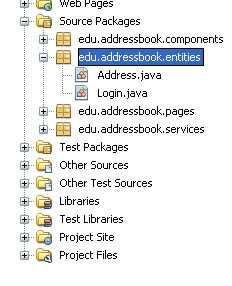
You should be looking at something that looks like the screenshot #2 after finishing the wizard. If you look at the code inside the entities you should notice is basically a POJO with bits of annotations - lots of get and set methods.
With that, we start creating our abstract interfaces for our DAO. Abstract interfaces in DAO are simply Java interfaces and we need two - one for the address entity and another one for the login entity.
Remember, Java interfaces contain
"contract" methods that we implement somewhere else by implementing the interface. Here is the AddressDAO interface. There is If you notice the methods are CREATE, RETRIEVE, UPDATE and DELETE hence CRUD applications. You can also change this to synonyms like create = add; retrieveAll = findAll, etc. You get the idea.
 public interface AddressDAO {
   public void create(Address newAddress);
   public List<Address> retrieveAll();
   public void update(Address address);
   public void delete(Address address);
 }
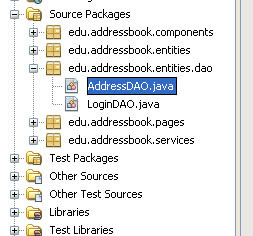
The LoginDAO interface has exactly the same contents. Just change the Address entities into Login entities. And don't forget to import the List interface from the java.util package.
Now stay tune for part 2....


