Monday, June 9, 2014

Somehow I got it to work: Tapestry 5.4-beta10 and Google App Engine

Aside from a bunch of crummy errors and missing files, I manage to to get Tapestry 5.4-beta10 to run in a Google App Engine instance. Here's what I learned:
  1. Java 8 and Tapestry 5 don't like each other. A bunch of guys reported it like Matt Raible. There's a work around and it isn't exactly safe for production (yet).
  2. YUIcompressor is missing again from the staging repo.
  3. You need to MAKE sure that your GAE instance name matches your appengine-web.xml application name. 
So how to go about getting your Tapestry5 into GAE. 
  1. Start by creating a Tapestry 5 project via maven. Which one though depends on what version of Java is on your dev machine. I'm running Java 8 so I had to use something greater than 5.4-beta4. I just updated the pom.xml and ran mvn clean compile.
  2. Add a appengine-web.xml to the src/main/webapp/WEB-INF folder.
    <?xml version="1.0" encoding="utf-8"?>  
     <appengine-web-app xmlns="http://appengine.google.com/ns/1.0">  
       <application>YOURAPPNAMEHERE</application>  
       <version>1</version>  
       <threadsafe>true</threadsafe>  
       <sessions-enabled>true</sessions-enabled>  
     </appengine-web-app>
    
  3. Edit the pom.xml to include google app engine devserver. Look for the plugins section and add this lines.
    <!-- Run the application using "mvn appengine:devserver" -->  
     <plugin>  
               <groupId>com.google.appengine</groupId>  
               <artifactId>appengine-maven-plugin</artifactId>  
               <version>${appengine.target.version}</version>  
               <configuration>  
                         <enableJarClasses>false</enableJarClasses>  
                         <port>8182</port>  
                         <address>0.0.0.0</address>  
               </configuration>  
     </plugin> 
    
    Also, add these values in the properties node:
            <appengine.target.version>1.9.6</appengine.target.version>
    
  4. Run mvn appengine:devserver
    There is where it gets hairy, if it fails to run, check the stack trace. If it says yuicompressor is missing then comment it out in the pom.xml and then make sure to run the app in dev mode by adding this line in the AppModule.java in the contributeApplicationDefaults method:
       configuration.add(SymbolConstants.PRODUCTION_MODE, false);
    
    There should clear it up. If there are more problems refer to the appengine docs for maven.
  5. If all goes well and you should have a running Tapestry5 app running locally inside a appengine devserver instance. The next step is to upload it to the appengine servers because that's the whole point.
  6. Run mvn appengine:update
    There should open a web page where authentication code to paste into the command line. Also, I do hope you already created a matching app engine project. No? You are a dumbass.
Here is my tapestry5 after all of that.

Monday, May 26, 2014

SoundManager2, jquery, angular and the Hotline Miami OST - Part 1

Sound Manager 2
I haven't written anything in the last 30 days. I've been a busy and lazy (among other things). But I had to write these things down before I forget again. I'm planning to do this in 2 parts so it won't be that long to read.

Sound Manager 2
Sound Manager 2 is this JavaScript library simplify playing audio on a web page. Think embedded players like SoundCloud and such. It's pretty nifty with fail-over support for Mp3 via Flash if you somehow have a retarded web browser who can't play an HTML5 audio tag. The whole point is you end up with a single API to use to play audio files IF only it didn't have a few gotchas.

The SM2 Gotchas that got me in the ass
  • Read the requirements page closely. Don't do what I did and dove straight into the API and got hung up on a few issues (some Flash crap and arbitrary seeking) which could have been resolved quite easily and quickly if I have READ THE FUCKING REQUIREMENT'S PAGE a bit more closely. 
  • Variable Bitrate (VBR) MP3s bad, Constant Bitrate (CBR) MP3s good
  • HTTP 206 Header (Partial Content). If you are like me and got a soup nazi for web administrator, use curl or Fiddler and test your Apache because it might be turned off. We don't want a "No soup for you" incident.
Using SM2 and turning it into a Jquery plugin
SM2 can easily be used with Jquery and turn it into a plugin. The challenging parts are deciding on how to deal with the settings (and there are a lot of SM2 settings) and how to handle the sound objects.

For the setting, I decided to go with sensible defaults that can be overridden and use jquery's $.extend function to merge it. It more or less looks like:
// default settings
var settings = {
    autoplay: false,
    loop: false,
    playNextOnFinish: true,
    hideTrackDetailsAfterPlay: false, /* N (Number) seconds, or false (Boolean) to always show it */
    soundManagerMultiShot: false, /* let sounds "restart" or "chorus" when played multiple times..*/
    soundManagerStream: true,  /* allows playing before entire file has loaded (recommended) */
    soundManagerSwfURL: 'swf/', /* path (String), relative to your html page */
    soundManagerFlashVersion: 9,
    soundManagerDebug: false, /* displays the SM2 debug info into the page and in the console */
    soundManagerHandleFlashBlock: true,
    soundManagerPreferFlash: false,
    soundManagerHTML5Audio: true,
    soundManagerFlashLoadTimeout: 1000
};
    .
    .
    // jquery plugin
    $.fn.smsplayer = function(options){
      if(options){
         $.extend(settings, options); // Merge options to settings
      }
      return this.each(function (){
         ....
      }
    } 

Usage therefore would look like:


As for the Sound objects, I decided to to handle them in an array.

var tracks = [],trackIDs = [];
.
.
$("#player").find('#playlist li > a').each(function(i) {
  var soundID = 'sms_sound_' + i.toString();
      $(this).addClass(soundID);
      trackIDs.push(soundID);
      var sound = soundManager.createSound({
                  id: trackIDs[trackIDs.length - 1],
                  url: $(this).attr('href'),
                  whileplaying: function() {
                    Player.prototype.updateTime(this.position, this.durationEstimate);
                  },
                  whileloading: function() {
                    Player.prototype.updateLoading(this.bytesLoaded, this.bytesTotal);
                  },
                  onfinish: function(){
                    isPlaying = false;
                    $('#playlist .playing').removeClass('playing');
                        
                    if(settings.autoplay){
                       var nextSound = Player.prototype.getNextTrackFrom(trackIDs, this.id);
                       currentTrackID = nextSound;
                       $('.' + currentTrackID).parent().addClass('playing');
                       Player.prototype.playSound(nextSound);   
                    }
                         
                  }
       });
       tracks.push(sound);

I'm going to explain the Hotline Miami OST in part 2.

Wednesday, March 19, 2014

4 code editors you should be looking at (and none of them is Atom)

  1. Notepad++. I like it because its snappy and an outright replaced to notepad on Windows systems. It also have a bunch of plugins for everything. My favorite use of Notepad++ is to view and format JSON, It's also a pretty capable source code editor with line numbers and color highlighting for a lot of languages.

    Notepad++

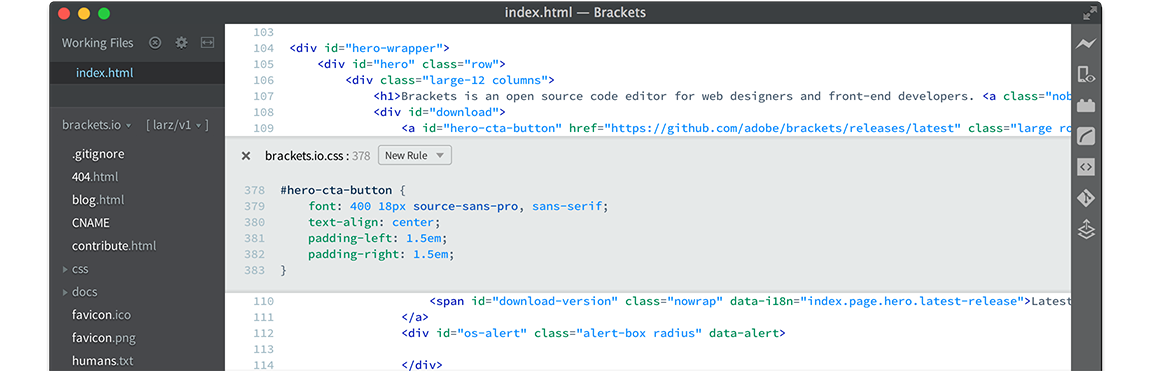
  2. Brakets. This free code editor is geared towards JS and HTML5 scripters - frontend people; it has this cool feature called "live html" where you connect Brackets to a live server and "edit" the site live. It also has a lot of plugins, I especially like the color/swatch plugin where when you edit CSS colors, it pops up a color selector helping you pick the right shade of blue or whatever. It's also nice that it understands CSS dialects like Less and SaSS.

    brackets.io

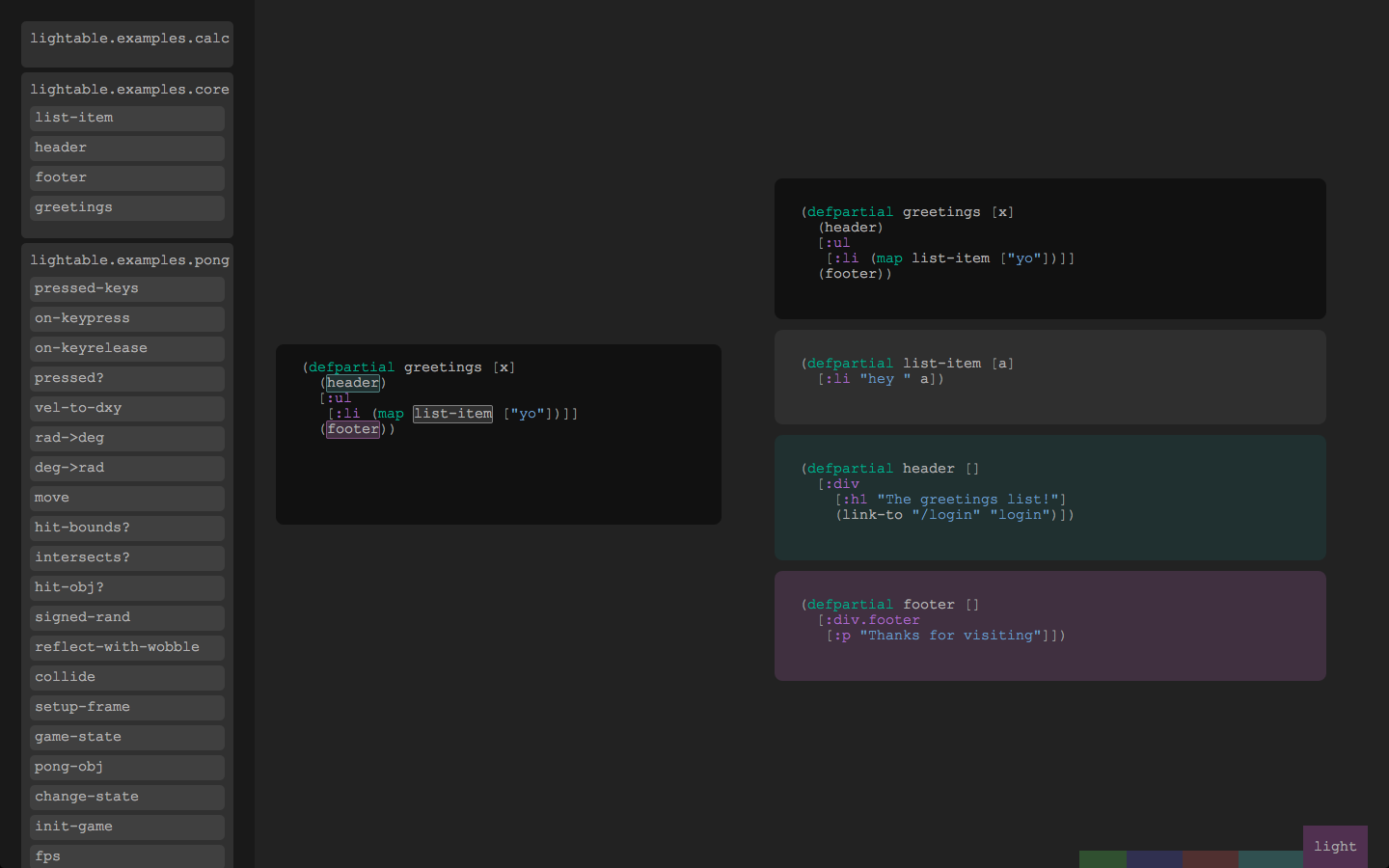
  3. Lighttable. Although its sort of still in the dev stages it's quite stable on my ElementaryOS machine. It HAS GOT TO BE the coolest IDE I've seen and use.  Lighttable has this killer feature where it cross a REPL with a source editor giving you the feel that you are editing running code. It also has this notion that a file is not the smallest unit of organization but a function is. Did I mention that it's free?

    Lighttable

  4. Netbeans 8. Aside from being free, Netbeans has got to have the some of the best toolsets for Java development found on a single IDE. It has wizards for all of Java world's coolest libraries like Hibernate, Spring and Swing. It also has killer support for web technologies like AngularJS, HTML5, Less and SaSS. Aside from that, Netbeans also has built in support of workflow units like Maven, Git and Mercurial. It also has a pretty lively plugin ecosystem making able to support other languages not just Java like Ruby with Rails.

    Netbeans